> ## Documentation Index
> Fetch the complete documentation index at: https://docs.venice.ai/llms.txt
> Use this file to discover all available pages before exploring further.
# Autonomous Agent API Key Creation
> Mint a Venice API key autonomously from an on-chain AI agent by staking VVV on Base and signing a Venice-issued validation token with a wallet.
An AI agent that controls a wallet on Base can mint its own Venice API key with no human in the loop. The agent acquires VVV, stakes it, signs a short-lived validation token issued by Venice, and posts the signed token back to receive a fresh API key tied to the staking wallet.
This guide walks through the full flow end to end and covers the funding options for actually paying for inference once the key is minted.
## Prerequisites
* An EVM wallet on Base controlled by the agent (private key in an env var or secret manager).
* A small amount of ETH on Base for gas (staking is two transactions: `approve` then `stake`).
* Any non-zero amount of VVV to stake. The minting endpoint requires only that the wallet has a non-zero sVVV balance, so 1 VVV is enough to mint a key. See [Paying for inference](#paying-for-inference) for what you need to actually call paid endpoints.
Use a dedicated agent wallet rather than a treasury wallet. The wallet's private key signs every Venice token request, so its blast radius should be small.
## Steps
Send VVV to the agent's wallet, or have the agent swap on a DEX such as [Aerodrome](https://aerodrome.finance/swap?from=eth\&to=0xacfe6019ed1a7dc6f7b508c02d1b04ec88cc21bf\&chain0=8453\&chain1=8453) or [Uniswap](https://app.uniswap.org/swap?chain=base\&inputCurrency=NATIVE\&outputCurrency=0xacfe6019ed1a7dc6f7b508c02d1b04ec88cc21bf).
VVV token contract on Base: `0xacfE6019Ed1A7Dc6f7B508C02d1b04ec88cC21bf`
Stake the VVV in the [Venice Staking Smart Contract](https://basescan.org/address/0x321b7ff75154472b18edb199033ff4d116f340ff#code) at `0x321b7ff75154472B18EDb199033fF4D116F340Ff`. This is two transactions:
1. `approve(spender, amount)` on the VVV token, where `spender` is the staking contract.
2. `stake(amount)` on the staking contract.
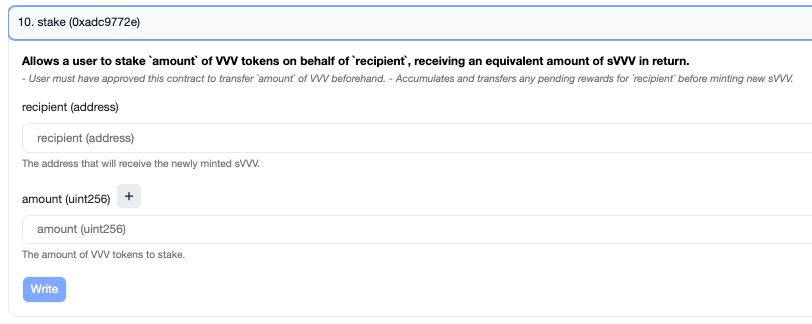 When the second transaction confirms, the wallet's VVV balance decreases and its sVVV balance increases by the same amount. The minting endpoint reads the sVVV balance to confirm the wallet is staked.
Call `GET /api/v1/api_keys/generate_web3_key` to get a short-lived token signed by Venice. The endpoint is unauthenticated.
```bash theme={"system"}
curl --request GET \
--url https://api.venice.ai/api/v1/api_keys/generate_web3_key
```
The response contains a `token` field. The token expires 15 minutes after issuance, so sign and submit it well before then.
Sign the raw token string with the wallet that holds the staked VVV. This is a standard `personal_sign` over the token bytes. Both `ethers.Wallet.signMessage(token)` and `viem`'s `account.signMessage({ message: token })` produce the correct signature.
`POST` the address, signature, and token to the same endpoint, along with the type of key you want.
```bash theme={"system"}
curl --request POST \
--url https://api.venice.ai/api/v1/api_keys/generate_web3_key \
--header 'Content-Type: application/json' \
--data '{
"address": "",
"signature": "",
"token": "",
"apiKeyType": "INFERENCE",
"description": "Agent key minted on "
}'
```
Required fields: `address`, `signature`, `token`, `apiKeyType` (`INFERENCE` or `ADMIN`).
Optional fields: `description`, `expiresAt`, `consumptionLimit` (caps total spend on this key, denominated in `usd`, `vcu`, or `diem`).
On success the response contains the minted `apiKey` string. Store it in the agent's secret store and use it as a normal Bearer token (`Authorization: Bearer `).
## End-to-end example
The example below uses a real wallet from an environment variable rather than a randomly generated one. A random wallet has no staked VVV and the mint will be rejected with the `Wallet has no staked VVV on Base` error.
```typescript theme={"system"}
import { ethers } from "ethers"
const wallet = new ethers.Wallet(process.env.WALLET_PRIVATE_KEY!)
const address = wallet.address
const tokenResponse = await fetch("https://api.venice.ai/api/v1/api_keys/generate_web3_key")
const { data: { token } } = await tokenResponse.json()
const signature = await wallet.signMessage(token)
const mintResponse = await fetch("https://api.venice.ai/api/v1/api_keys/generate_web3_key", {
method: "POST",
headers: { "Content-Type": "application/json" },
body: JSON.stringify({
address,
signature,
token,
apiKeyType: "INFERENCE",
description: "Agent key",
}),
})
const result = await mintResponse.json()
if (!mintResponse.ok) {
throw new Error(`Mint failed: ${result.error}`)
}
console.log("Minted key:", result.data.apiKey)
```
## Error reference
The endpoint returns specific, actionable error messages. Map these in the agent so it can decide whether to retry, request a new token, or stop.
| Status | Error message contains | What it means | What to do |
| ------ | ----------------------------------- | ------------------------------------------------------------------------ | ------------------------------------------------------------------------------- |
| `400` | `Invalid wallet address` | The `address` field is not a valid EVM address. | Fix the address and resubmit. |
| `400` | `JWT has expired` | The validation token expired before you signed and submitted it. | Request a new token, sign it, and submit immediately. |
| `400` | `JWT signature is invalid` | The token was not signed by Venice (likely tampered with or fabricated). | Always use a fresh token from the `GET` endpoint. |
| `400` | `JWT claims are invalid` | The token's issuer or audience does not match what Venice expects. | Use the unmodified token returned by the `GET` endpoint. |
| `400` | `JWT is malformed` | The submitted `token` is not a JWT. | Ensure you are sending the exact `token` string returned by the `GET` endpoint. |
| `400` | `Wallet signature does not match` | The `signature` does not match the `address` for the given `token`. | Sign the raw token bytes with the wallet that owns `address`. |
| `400` | `Could not verify wallet signature` | RPC call to verify the signature failed (transient). | Retry with backoff. |
| `400` | `Wallet has no staked VVV on Base` | The wallet has zero sVVV balance. | Stake VVV first, then retry. |
## Paying for inference
Minting a key and being able to call paid endpoints with it are two separate things. A freshly minted key authenticates correctly but cannot call paid endpoints (such as `/chat/completions`) until the wallet's account has a spendable balance.
The minted key can spend from the user account in this priority order: DIEM, then bundled credits, then USD.
| Funding source | Autonomous? | How |
| -------------------------------- | ------------ | -------------------------------------------------------------------------------------------------------------------------------------------------------------------------------------------------------------------------------------------------- |
| **DIEM from VVV staking** | Yes | The wallet's daily DIEM allocation is proportional to its share of the staking pool. The account needs at least 0.1 staked DIEM for any DIEM to be spendable. Larger stakes earn proportionally more daily DIEM, refreshed each epoch (00:00 UTC). |
| **USD via Stripe** | No (browser) | Sign into venice.ai with the same wallet (Sign-In-With-Ethereum). The dashboard finds the existing user record. Add credits in Settings, API. |
| **Coinbase crypto subscription** | No (browser) | Same wallet sign-in, then subscribe through the dashboard. The flow redirects to Coinbase Commerce for the actual payment, so it cannot be driven from a script. |
| **Coinbase onramp** | No (browser) | Same wallet sign-in, then use the onramp widget in the dashboard. Hosted on Coinbase's UI. |
If the agent needs a fully crypto-native, headless funding path, the cleanest options are:
1. **Stake more VVV** so the daily DIEM allocation covers the agent's spend. The minted key picks this up automatically.
2. **Use the [x402 wallet flow](/guides/integrations/x402-venice-api) instead of the API key.** With x402 the agent signs a Sign-In-With-X message per request, tops up directly with USDC on Base or Solana via `POST /api/v1/x402/top-up`, and pays per request. The x402 USDC balance is wallet-bound, not user-bound, so it does not show up as balance for the minted Bearer key, but it does let the same wallet pay for inference programmatically.
## Related resources
Use Venice as both the model provider and the blockchain RPC layer for autonomous agents.
Pay per request with USDC on Base or Solana, no API key required.
Endpoint reference for the mint endpoint.
For users who prefer to mint a key from the dashboard.
When the second transaction confirms, the wallet's VVV balance decreases and its sVVV balance increases by the same amount. The minting endpoint reads the sVVV balance to confirm the wallet is staked.
Call `GET /api/v1/api_keys/generate_web3_key` to get a short-lived token signed by Venice. The endpoint is unauthenticated.
```bash theme={"system"}
curl --request GET \
--url https://api.venice.ai/api/v1/api_keys/generate_web3_key
```
The response contains a `token` field. The token expires 15 minutes after issuance, so sign and submit it well before then.
Sign the raw token string with the wallet that holds the staked VVV. This is a standard `personal_sign` over the token bytes. Both `ethers.Wallet.signMessage(token)` and `viem`'s `account.signMessage({ message: token })` produce the correct signature.
`POST` the address, signature, and token to the same endpoint, along with the type of key you want.
```bash theme={"system"}
curl --request POST \
--url https://api.venice.ai/api/v1/api_keys/generate_web3_key \
--header 'Content-Type: application/json' \
--data '{
"address": "",
"signature": "",
"token": "",
"apiKeyType": "INFERENCE",
"description": "Agent key minted on "
}'
```
Required fields: `address`, `signature`, `token`, `apiKeyType` (`INFERENCE` or `ADMIN`).
Optional fields: `description`, `expiresAt`, `consumptionLimit` (caps total spend on this key, denominated in `usd`, `vcu`, or `diem`).
On success the response contains the minted `apiKey` string. Store it in the agent's secret store and use it as a normal Bearer token (`Authorization: Bearer `).
## End-to-end example
The example below uses a real wallet from an environment variable rather than a randomly generated one. A random wallet has no staked VVV and the mint will be rejected with the `Wallet has no staked VVV on Base` error.
```typescript theme={"system"}
import { ethers } from "ethers"
const wallet = new ethers.Wallet(process.env.WALLET_PRIVATE_KEY!)
const address = wallet.address
const tokenResponse = await fetch("https://api.venice.ai/api/v1/api_keys/generate_web3_key")
const { data: { token } } = await tokenResponse.json()
const signature = await wallet.signMessage(token)
const mintResponse = await fetch("https://api.venice.ai/api/v1/api_keys/generate_web3_key", {
method: "POST",
headers: { "Content-Type": "application/json" },
body: JSON.stringify({
address,
signature,
token,
apiKeyType: "INFERENCE",
description: "Agent key",
}),
})
const result = await mintResponse.json()
if (!mintResponse.ok) {
throw new Error(`Mint failed: ${result.error}`)
}
console.log("Minted key:", result.data.apiKey)
```
## Error reference
The endpoint returns specific, actionable error messages. Map these in the agent so it can decide whether to retry, request a new token, or stop.
| Status | Error message contains | What it means | What to do |
| ------ | ----------------------------------- | ------------------------------------------------------------------------ | ------------------------------------------------------------------------------- |
| `400` | `Invalid wallet address` | The `address` field is not a valid EVM address. | Fix the address and resubmit. |
| `400` | `JWT has expired` | The validation token expired before you signed and submitted it. | Request a new token, sign it, and submit immediately. |
| `400` | `JWT signature is invalid` | The token was not signed by Venice (likely tampered with or fabricated). | Always use a fresh token from the `GET` endpoint. |
| `400` | `JWT claims are invalid` | The token's issuer or audience does not match what Venice expects. | Use the unmodified token returned by the `GET` endpoint. |
| `400` | `JWT is malformed` | The submitted `token` is not a JWT. | Ensure you are sending the exact `token` string returned by the `GET` endpoint. |
| `400` | `Wallet signature does not match` | The `signature` does not match the `address` for the given `token`. | Sign the raw token bytes with the wallet that owns `address`. |
| `400` | `Could not verify wallet signature` | RPC call to verify the signature failed (transient). | Retry with backoff. |
| `400` | `Wallet has no staked VVV on Base` | The wallet has zero sVVV balance. | Stake VVV first, then retry. |
## Paying for inference
Minting a key and being able to call paid endpoints with it are two separate things. A freshly minted key authenticates correctly but cannot call paid endpoints (such as `/chat/completions`) until the wallet's account has a spendable balance.
The minted key can spend from the user account in this priority order: DIEM, then bundled credits, then USD.
| Funding source | Autonomous? | How |
| -------------------------------- | ------------ | -------------------------------------------------------------------------------------------------------------------------------------------------------------------------------------------------------------------------------------------------- |
| **DIEM from VVV staking** | Yes | The wallet's daily DIEM allocation is proportional to its share of the staking pool. The account needs at least 0.1 staked DIEM for any DIEM to be spendable. Larger stakes earn proportionally more daily DIEM, refreshed each epoch (00:00 UTC). |
| **USD via Stripe** | No (browser) | Sign into venice.ai with the same wallet (Sign-In-With-Ethereum). The dashboard finds the existing user record. Add credits in Settings, API. |
| **Coinbase crypto subscription** | No (browser) | Same wallet sign-in, then subscribe through the dashboard. The flow redirects to Coinbase Commerce for the actual payment, so it cannot be driven from a script. |
| **Coinbase onramp** | No (browser) | Same wallet sign-in, then use the onramp widget in the dashboard. Hosted on Coinbase's UI. |
If the agent needs a fully crypto-native, headless funding path, the cleanest options are:
1. **Stake more VVV** so the daily DIEM allocation covers the agent's spend. The minted key picks this up automatically.
2. **Use the [x402 wallet flow](/guides/integrations/x402-venice-api) instead of the API key.** With x402 the agent signs a Sign-In-With-X message per request, tops up directly with USDC on Base or Solana via `POST /api/v1/x402/top-up`, and pays per request. The x402 USDC balance is wallet-bound, not user-bound, so it does not show up as balance for the minted Bearer key, but it does let the same wallet pay for inference programmatically.
## Related resources
Use Venice as both the model provider and the blockchain RPC layer for autonomous agents.
Pay per request with USDC on Base or Solana, no API key required.
Endpoint reference for the mint endpoint.
For users who prefer to mint a key from the dashboard.