> ## Documentation Index
> Fetch the complete documentation index at: https://docs.venice.ai/llms.txt
> Use this file to discover all available pages before exploring further.

# Privacy

> How Venice handles prompts, responses, and metadata, plus the privacy modes available: anonymized, private, Trusted Execution, and end-to-end encrypted.

One of Venice's guiding principles is user privacy. The platform's architecture flows from this philosophical principle, and every component is designed with this objective in mind.

> The only way to achieve reasonable user privacy is to avoid collecting this information in the first place. This is harder to do from an engineering perspective, but we believe it is the correct approach.

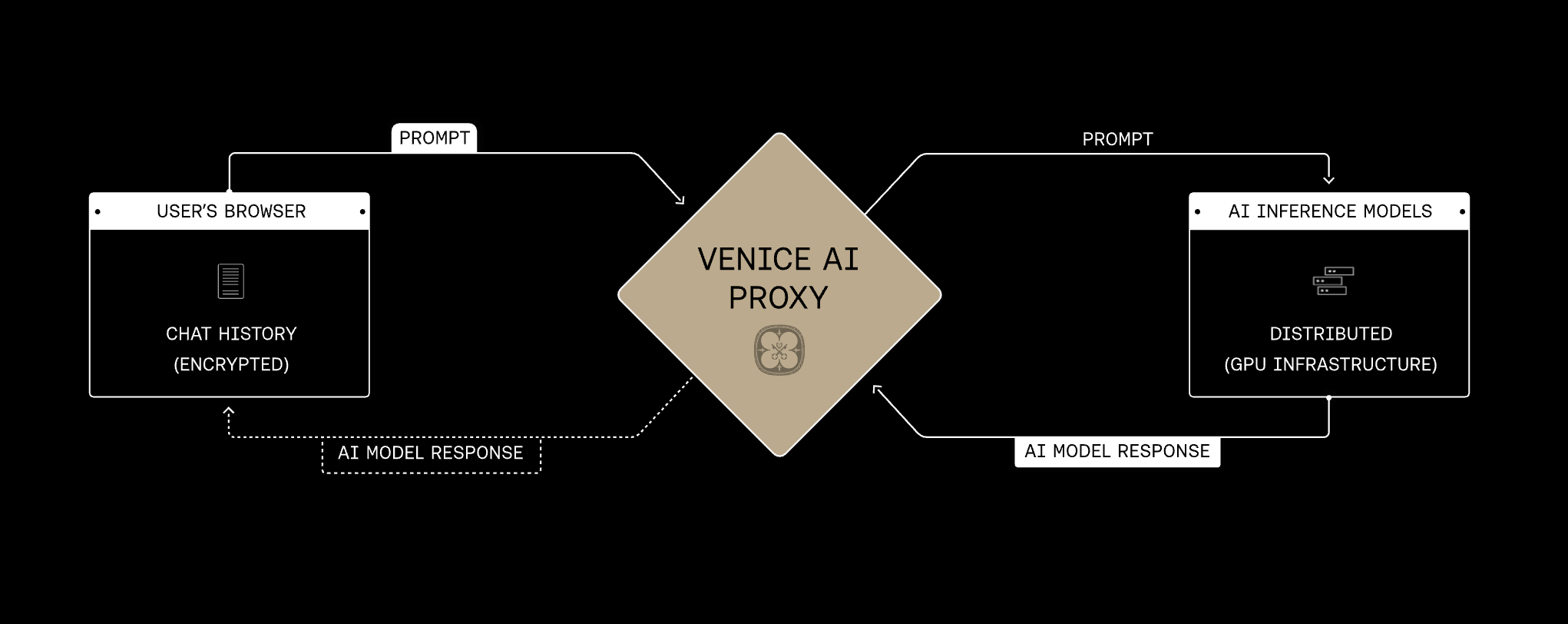
The Venice API replicates the same backend privacy architecture as the Venice platform: requests pass through the Venice proxy over encrypted connections, Venice does not store or log prompt and response content for normal inference, and each selected model adds one of four privacy modes at the runtime layer: Anonymous, Private, TEE, or E2EE.

<img src="https://mintcdn.com/veniceai/IFxWLBK8qRcf4Dhb/images/privacy-architecture.png?fit=max&auto=format&n=IFxWLBK8qRcf4Dhb&q=85&s=dc109b987638ae5757c4987a971ae809" alt="Venice AI Privacy Architecture" width="2042" height="812" data-path="images/privacy-architecture.png" />

## Privacy architecture

The Venice proxy is the shared foundation for every privacy mode. Requests pass through Venice over HTTPS/TLS and are relayed without Venice storing prompt or response content. The privacy mode on the selected model determines what happens next at the provider or model runtime layer.

Venice presents model privacy in four modes. They build on the same proxy foundation and add progressively stronger protections, from obscuring identity from the provider to encrypting prompts end-to-end into a verified enclave.

<div className="venice-privacy-level-label">Increasing privacy protection</div>

<div className="venice-privacy-mode-grid">
  <div className="venice-privacy-mode-card venice-privacy-mode-anonymous">
    <div className="venice-privacy-mode-header">
      <span className="venice-privacy-mode-name">Anonymous</span>
    </div>

    <h3>Identity obscured from provider</h3>
    <p>Venice proxies the request without sending your Venice identity to the model provider. Prompt content is still visible to that provider.</p>
  </div>

  <div className="venice-privacy-mode-card venice-privacy-mode-private">
    <div className="venice-privacy-mode-header">
      <span className="venice-privacy-mode-name">Private</span>
    </div>

    <h3>Zero data retention, contract-enforced</h3>
    <p>Prompt and response content is processed for inference only and is not retained after the request completes.</p>
  </div>

  <div className="venice-privacy-mode-card venice-privacy-mode-tee">
    <div className="venice-privacy-mode-header">
      <span className="venice-privacy-mode-name">TEE</span>
    </div>

    <h3>Hardware-isolated inference</h3>
    <p>Supported models run inside a Trusted Execution Environment with remote attestation support.</p>
  </div>

  <div className="venice-privacy-mode-card venice-privacy-mode-e2ee">
    <div className="venice-privacy-mode-header">
      <span className="venice-privacy-mode-name">E2EE</span>
    </div>

    <h3>End-to-end encrypted to a verified TEE</h3>
    <p>Your client encrypts the prompt before sending it. Venice relays ciphertext, and only the verified TEE decrypts it.</p>
  </div>
</div>

The `/models` endpoint tells you each model's privacy level. Models marked as `anonymized` are Anonymous models, and models marked as `private` are Private models. TEE and E2EE are shown separately in the model's capabilities, such as `supportsTeeAttestation` and `supportsE2EE`.

<Info>
  For implementation details, see the [TEE & E2EE models guide](/guides/features/tee-e2ee-models).
</Info>

## TEE and E2EE

TEE and E2EE models add cryptographic and hardware-backed controls on top of Venice's default no-content-retention approach.

<CardGroup cols={2}>
  <Card title="Use TEE when" icon="shield-halved">
    You want the model to run inside an attested hardware enclave, but your client can send plaintext prompts over the normal API request.
  </Card>

  <Card title="Use E2EE when" icon="lock">
    You want prompts encrypted before they leave your client and decrypted only inside a verified TEE.
  </Card>
</CardGroup>

The E2EE flow uses `/chat/completions` with E2EE-capable models. Your client must fetch attestation, verify the nonce and enclave evidence, encrypt `user` and `system` messages, send the `X-Venice-TEE-*` headers, stream the response, and verify/decrypt response content.

E2EE also disables features that need plaintext outside the enclave, such as web search, memory, summaries, some tool flows, and other server-side processing.

## Choosing a model

Use `/models` to see what privacy protections each model supports before you send a request.

Each model has two relevant fields:

* `model_spec.privacy` tells you the model's baseline privacy mode:
  * `anonymized`: Venice hides your identity from the provider, but the provider may still see the prompt.
  * `private`: Venice routes the request through zero-data-retention infrastructure.
* `model_spec.capabilities` tells you whether the model supports stronger protections:
  * `supportsTeeAttestation`: the model can run inside a verifiable Trusted Execution Environment.
  * `supportsE2EE`: the model can accept client-encrypted prompts that are decrypted only inside the TEE.

E2EE is a client-driven flow. Your application must encrypt the request, verify attestation, and verify/decrypt the response. See the [TEE & E2EE models guide](/guides/features/tee-e2ee-models).

<CodeGroup>
  ```bash cURL theme={"system"}
  curl https://api.venice.ai/api/v1/models \
    -H "Authorization: Bearer $API_KEY_VENICE" | \
    jq '.data[] | {
      id,
      privacy: .model_spec.privacy,
      tee: .model_spec.capabilities.supportsTeeAttestation,
      e2ee: .model_spec.capabilities.supportsE2EE
    }'
  ```
</CodeGroup>

A simple rule of thumb: choose `private` for zero data retention, choose `tee: true` for hardware-backed isolation, and choose `e2ee: true` when you need prompts encrypted before they leave your client.

## Operational metadata

Venice may process metadata needed for authentication, billing, abuse prevention, reliability, analytics, and support. Depending on how you use the product, this can include account or wallet identifiers, API key identifiers, request timestamps, selected model, token counts, billing amounts, rate-limit state, request IDs, IP address, browser or device information, and product event logs.

This metadata is used to operate the API and is separate from prompt and response content. Billing and usage records track details such as model, endpoint, token counts, timestamps, and account identifiers; they do not require storing the prompt or completion.
