> ## Documentation Index
> Fetch the complete documentation index at: https://docs.venice.ai/llms.txt
> Use this file to discover all available pages before exploring further.
# 透明背景图像
> 在 /image/generate、/image/edit 和 /image/multi-edit 上使用 transparent_background,或在 OpenAI 兼容端点上使用 background: transparent,生成和编辑带真实 alpha 通道的 PNG 或 WebP 图像。
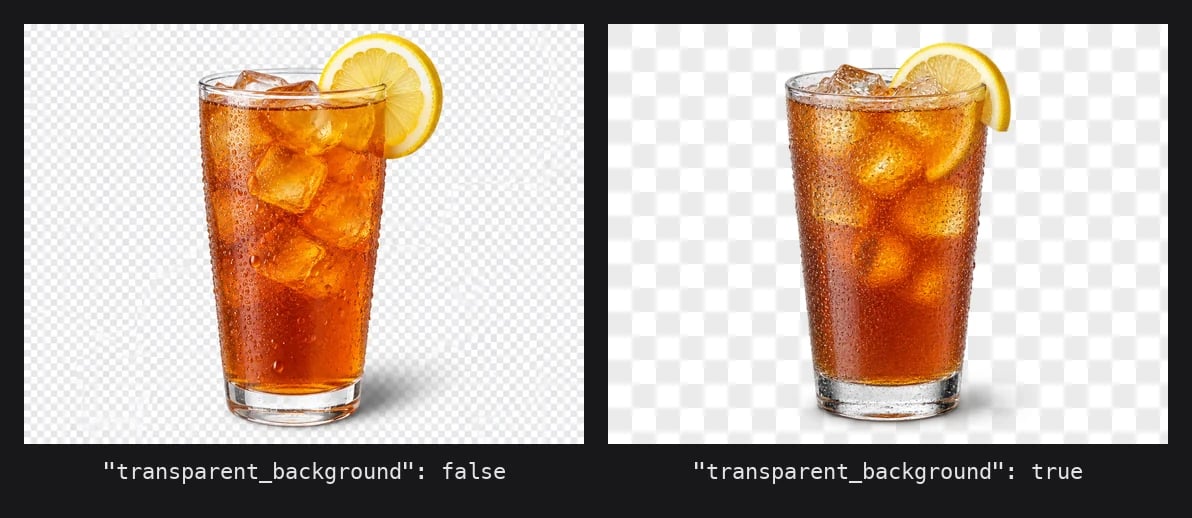
Venice 的图像 API 可以返回带真实 alpha 通道的图像,而不是绘制出来的白色或棋盘格背景。模型从一开始就以透明方式构图,因此边缘、阴影和半透明区域(玻璃、头发、烟雾)带有逐像素的 alpha 值,而不是生硬的遮罩。
这与 `/image/background-remove` 不同,后者接收一张已完成的不透明图像,并在事后分割出前景。如果您本来就要生成或编辑素材,请使用原生透明度;如果您手头只有不透明图像,请使用背景移除。
 ## 您需要什么
| 要求 | 详情 |
| - | - |
| 模型 | 在 `GET /models` 约束中标记为 `supportsTransparentBackground: true` 的模型。目前为 `gpt-image-1-5`、`gpt-image-2-5-flare` 和 `gpt-image-2-5-sunburst`(编辑端点使用它们的 `-edit` 变体) |
| 输出格式 | `png` 或 `webp`。JPEG 没有 alpha 通道,因此 `jpeg` 会被拒绝 |
| 参数 | 在 `/image/generate`、`/image/edit`、`/image/multi-edit` 上使用 `transparent_background: true`。在 `/images/generations` 上使用 `background: "transparent"` |
其他任何情况都会在推理运行前返回 `400`,因此被拒绝的请求不会产生费用。
## 第 1 步:生成透明图像
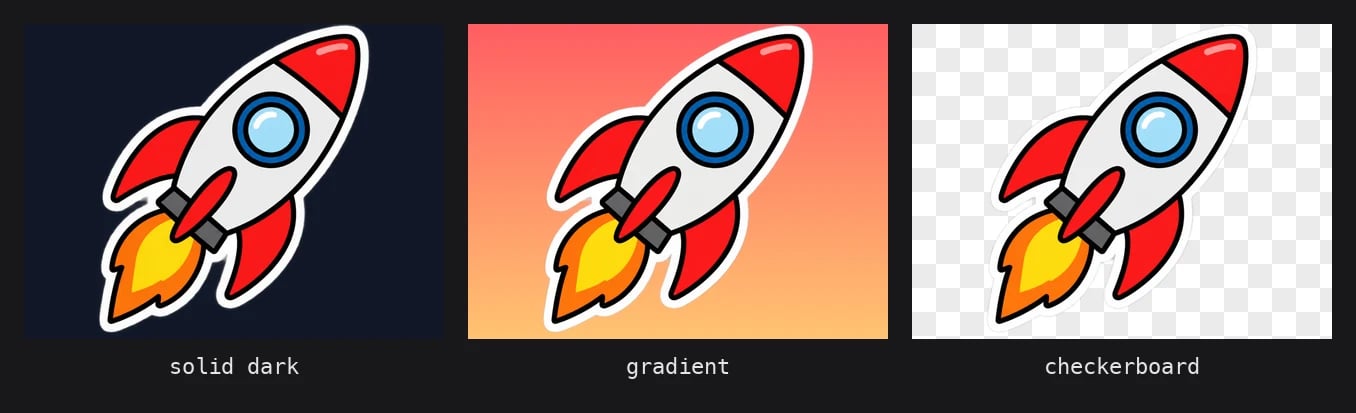
`/image/generate` 是原生端点。将 `format` 设为 `png` 或 `webp`,并将 `transparent_background` 设为 `true`。
```bash theme={"system"}
curl https://api.venice.ai/api/v1/image/generate \
-H "Authorization: Bearer $VENICE_API_KEY" \
-H "Content-Type: application/json" \
-o sticker.png \
-d '{
"model": "gpt-image-2-5-flare",
"prompt": "A die-cut sticker of a cartoon rocket ship, bold outlines, flat colors, no background",
"format": "png",
"transparent_background": true,
"quality": "low",
"return_binary": true
}'
```
响应为 `content-type: image/png`,像素布局为 RGBA。如果不使用 `return_binary`,您将得到常规的 JSON 封装,其中 `images[0]` 为 base64 字符串。
`format` 默认为 `webp`,它同样支持 alpha,因此省略 `format` 也可以。只有显式指定 `"format": "jpeg"` 才会失败。
除了设置该标志外,还要在 prompt 中写明 "no background" 或 "isolated on transparent background"。该标志保证存在 alpha 通道;prompt 则引导模型不要绘制地面、桌面或背景布,否则这些内容在主体边界框内会变成不透明。
## 第 2 步:验证 alpha 通道
不要轻信文件扩展名。检查像素模式并查看 alpha 分布,以确认背景确实是透明的,而不是被压平的白色填充。
```python theme={"system"}
from PIL import Image
im = Image.open("sticker.png")
print(im.format, im.mode, im.size) # PNG RGBA (1024, 1024)
alpha = im.getchannel("A")
hist = alpha.histogram()
total = sum(hist)
print(f"fully transparent: {100 * hist[0] / total:.1f}%")
print(f"partially transparent: {100 * sum(hist[1:255]) / total:.1f}%")
print("subject bbox:", alpha.getbbox())
```
正确的结果中,大部分像素的 alpha 为 `0`(背景),边缘处有一圈部分透明的值(抗锯齿和柔和阴影),且主体的边界框小于画布。如果 `im.mode` 为 `RGB` 或透明像素占比为 `0%`,说明 alpha 通道在您的处理流程中某处丢失了,通常是某个调整尺寸或重新编码的步骤将其丢弃。
## 您需要什么
| 要求 | 详情 |
| - | - |
| 模型 | 在 `GET /models` 约束中标记为 `supportsTransparentBackground: true` 的模型。目前为 `gpt-image-1-5`、`gpt-image-2-5-flare` 和 `gpt-image-2-5-sunburst`(编辑端点使用它们的 `-edit` 变体) |
| 输出格式 | `png` 或 `webp`。JPEG 没有 alpha 通道,因此 `jpeg` 会被拒绝 |
| 参数 | 在 `/image/generate`、`/image/edit`、`/image/multi-edit` 上使用 `transparent_background: true`。在 `/images/generations` 上使用 `background: "transparent"` |
其他任何情况都会在推理运行前返回 `400`,因此被拒绝的请求不会产生费用。
## 第 1 步:生成透明图像
`/image/generate` 是原生端点。将 `format` 设为 `png` 或 `webp`,并将 `transparent_background` 设为 `true`。
```bash theme={"system"}
curl https://api.venice.ai/api/v1/image/generate \
-H "Authorization: Bearer $VENICE_API_KEY" \
-H "Content-Type: application/json" \
-o sticker.png \
-d '{
"model": "gpt-image-2-5-flare",
"prompt": "A die-cut sticker of a cartoon rocket ship, bold outlines, flat colors, no background",
"format": "png",
"transparent_background": true,
"quality": "low",
"return_binary": true
}'
```
响应为 `content-type: image/png`,像素布局为 RGBA。如果不使用 `return_binary`,您将得到常规的 JSON 封装,其中 `images[0]` 为 base64 字符串。
`format` 默认为 `webp`,它同样支持 alpha,因此省略 `format` 也可以。只有显式指定 `"format": "jpeg"` 才会失败。
除了设置该标志外,还要在 prompt 中写明 "no background" 或 "isolated on transparent background"。该标志保证存在 alpha 通道;prompt 则引导模型不要绘制地面、桌面或背景布,否则这些内容在主体边界框内会变成不透明。
## 第 2 步:验证 alpha 通道
不要轻信文件扩展名。检查像素模式并查看 alpha 分布,以确认背景确实是透明的,而不是被压平的白色填充。
```python theme={"system"}
from PIL import Image
im = Image.open("sticker.png")
print(im.format, im.mode, im.size) # PNG RGBA (1024, 1024)
alpha = im.getchannel("A")
hist = alpha.histogram()
total = sum(hist)
print(f"fully transparent: {100 * hist[0] / total:.1f}%")
print(f"partially transparent: {100 * sum(hist[1:255]) / total:.1f}%")
print("subject bbox:", alpha.getbbox())
```
正确的结果中,大部分像素的 alpha 为 `0`(背景),边缘处有一圈部分透明的值(抗锯齿和柔和阴影),且主体的边界框小于画布。如果 `im.mode` 为 `RGB` 或透明像素占比为 `0%`,说明 alpha 通道在您的处理流程中某处丢失了,通常是某个调整尺寸或重新编码的步骤将其丢弃。
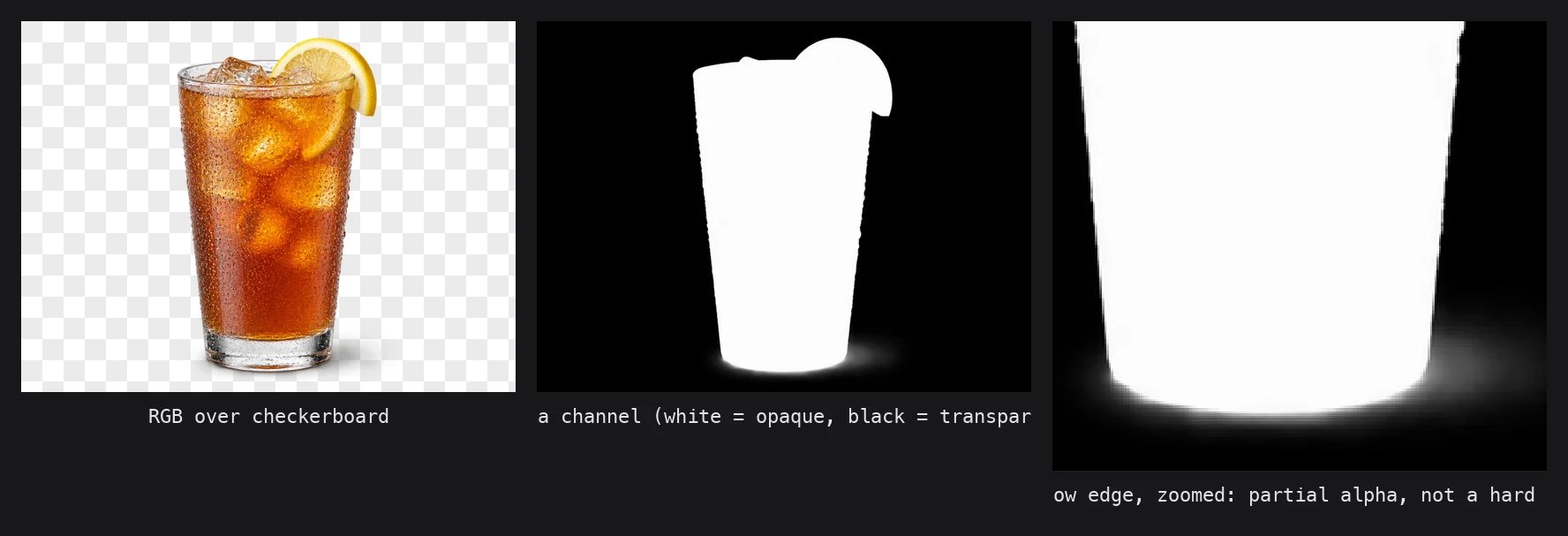 GPT Image 模型目前返回的不透明区域 alpha 值为 `252`–`254`,而不是 `255`。视觉上无法区分,但如果您用 `== 255` 作为阈值来查找主体,将得到一个空遮罩。请改用 `> 0` 或 `>= 250` 作为阈值。
## 第 3 步:使用 OpenAI 兼容端点
如果您已经在使用 OpenAI SDK,`/images/generations` 接受与 OpenAI 相同的 `background` 参数。将其设为 `"transparent"`,并选择 `png` 或 `webp` 作为 `output_format`。
```python theme={"system"}
import base64
from openai import OpenAI
client = OpenAI(
base_url="https://api.venice.ai/api/v1",
api_key=VENICE_API_KEY,
)
result = client.images.generate(
model="gpt-image-2-5-flare",
prompt="A flat vector icon of a paper airplane, isolated, no background",
output_format="webp",
background="transparent",
quality="low",
)
with open("icon.webp", "wb") as f:
f.write(base64.b64decode(result.data[0].b64_json))
```
`background` 接受 `transparent`、`opaque` 或 `auto`。`opaque`、`auto` 和 `null` 都保持模型的默认行为,因此唯一会改变结果的值是 `transparent`。在此端点上 `output_format` 默认为 `png`,因此可以省略。
## 第 4 步:带透明度的编辑
`/image/edit` 和 `/image/multi-edit` 同样接受 `transparent_background`。源图像不需要是透明的;您可以传入一张不透明照片,并让模型在编辑时将主体分离出来。
```bash theme={"system"}
curl https://api.venice.ai/api/v1/image/edit \
-H "Authorization: Bearer $VENICE_API_KEY" \
-F "model=gpt-image-2-5-flare-edit" \
-F "prompt=Make the apple green and remove the background" \
-F "image=@apple.jpg" \
-F "transparent_background=true" \
-o apple-green.png
```
在编辑端点上,省略 `output_format` 时会自动推断:通常 1K 编辑为 PNG,2K/4K 为 JPEG;但当 `transparent_background` 为 `true` 时,所有分辨率下都会推断为 PNG。因此只有在需要 WebP 时才需要显式发送 `output_format`。
multi-edit 的写法完全相同,只是用 `images[]` 代替 `image`。它非常适合将产品图合成到新场景中,并将合成结果作为抠图取回,以便放入您自己的版面中。
## 定价
透明度不会产生额外费用。您支付模型的常规单张图像价格,对于 GPT Image 2.5,该价格取决于 `resolution` 和 `quality`。在 `gpt-image-2-5-flare` 上进行 `1K` `low` 生成,是在为 `high` 或 `4K` 付费之前迭代贴纸或图标的最便宜方式。实时价格表请参见[图像模型](/zh/models/image)。
## 错误
验证在调用模型之前进行。两条错误消息都指明了修复方法。
| 请求 | 状态 | 响应体 |
| - | - | - |
| `transparent_background: true` 搭配 `format` / `output_format` `jpeg` | `400` | `Transparent background requires png or webp output format.` |
| 在不带该标志的模型上使用 `transparent_background: true` | `400` | `Transparent background is not supported by model 'flux-2-pro'. Use a model with "supportsTransparentBackground": true in its constraints (see GET /api/v1/models).` |
| 在 `/images/generations` 上使用 `background: "transparent"` 搭配 `output_format: "jpeg"` | `400` | `Transparent background requires png or webp output format.` |
`transparent_background: false` 搭配 `jpeg` 没有问题,会返回普通的不透明 JPEG。
## 在运行时发现受支持的模型
模型 ID 会更替。与其硬编码上面的列表,不如按约束标志筛选 `GET /models`。该键仅在支持它的模型上出现,且值为 `true`。
```bash theme={"system"}
curl -s "https://api.venice.ai/api/v1/models?type=image" \
| jq -r '.data[] | select(.model_spec.constraints.supportsTransparentBackground == true) | .id'
```
对于编辑端点,请使用 `type=inpaint`,它会返回 `-edit` 模型 ID。
## 何时使用此功能与 `/image/background-remove`
| | `transparent_background` | `/image/background-remove` |
| - | - | - |
| 输入 | 一个 prompt(以及可选的待编辑源图像) | 一张现有的不透明图像 |
| alpha 的生成方式 | 模型从一开始就以透明方式构图 | 分割模型在事后对前景进行遮罩 |
| 阴影和反射 | 保留,带部分 alpha,因为模型将其作为主体的一部分渲染 | 与背景一起被移除,因为它们不属于前景 |
| 模型选择 | 仅 GPT Image 1.5 / 2.5 | 固定的内部模型,无 `model` 字段 |
| 费用 | 模型的常规生成或编辑价格 | 固定的背景移除价格 |
如果您本来就要生成素材,请预先请求透明度,省去第二次调用。当不透明图像已经存在且您不想重新生成时,再使用 `/image/background-remove`。
GPT Image 模型目前返回的不透明区域 alpha 值为 `252`–`254`,而不是 `255`。视觉上无法区分,但如果您用 `== 255` 作为阈值来查找主体,将得到一个空遮罩。请改用 `> 0` 或 `>= 250` 作为阈值。
## 第 3 步:使用 OpenAI 兼容端点
如果您已经在使用 OpenAI SDK,`/images/generations` 接受与 OpenAI 相同的 `background` 参数。将其设为 `"transparent"`,并选择 `png` 或 `webp` 作为 `output_format`。
```python theme={"system"}
import base64
from openai import OpenAI
client = OpenAI(
base_url="https://api.venice.ai/api/v1",
api_key=VENICE_API_KEY,
)
result = client.images.generate(
model="gpt-image-2-5-flare",
prompt="A flat vector icon of a paper airplane, isolated, no background",
output_format="webp",
background="transparent",
quality="low",
)
with open("icon.webp", "wb") as f:
f.write(base64.b64decode(result.data[0].b64_json))
```
`background` 接受 `transparent`、`opaque` 或 `auto`。`opaque`、`auto` 和 `null` 都保持模型的默认行为,因此唯一会改变结果的值是 `transparent`。在此端点上 `output_format` 默认为 `png`,因此可以省略。
## 第 4 步:带透明度的编辑
`/image/edit` 和 `/image/multi-edit` 同样接受 `transparent_background`。源图像不需要是透明的;您可以传入一张不透明照片,并让模型在编辑时将主体分离出来。
```bash theme={"system"}
curl https://api.venice.ai/api/v1/image/edit \
-H "Authorization: Bearer $VENICE_API_KEY" \
-F "model=gpt-image-2-5-flare-edit" \
-F "prompt=Make the apple green and remove the background" \
-F "image=@apple.jpg" \
-F "transparent_background=true" \
-o apple-green.png
```
在编辑端点上,省略 `output_format` 时会自动推断:通常 1K 编辑为 PNG,2K/4K 为 JPEG;但当 `transparent_background` 为 `true` 时,所有分辨率下都会推断为 PNG。因此只有在需要 WebP 时才需要显式发送 `output_format`。
multi-edit 的写法完全相同,只是用 `images[]` 代替 `image`。它非常适合将产品图合成到新场景中,并将合成结果作为抠图取回,以便放入您自己的版面中。
## 定价
透明度不会产生额外费用。您支付模型的常规单张图像价格,对于 GPT Image 2.5,该价格取决于 `resolution` 和 `quality`。在 `gpt-image-2-5-flare` 上进行 `1K` `low` 生成,是在为 `high` 或 `4K` 付费之前迭代贴纸或图标的最便宜方式。实时价格表请参见[图像模型](/zh/models/image)。
## 错误
验证在调用模型之前进行。两条错误消息都指明了修复方法。
| 请求 | 状态 | 响应体 |
| - | - | - |
| `transparent_background: true` 搭配 `format` / `output_format` `jpeg` | `400` | `Transparent background requires png or webp output format.` |
| 在不带该标志的模型上使用 `transparent_background: true` | `400` | `Transparent background is not supported by model 'flux-2-pro'. Use a model with "supportsTransparentBackground": true in its constraints (see GET /api/v1/models).` |
| 在 `/images/generations` 上使用 `background: "transparent"` 搭配 `output_format: "jpeg"` | `400` | `Transparent background requires png or webp output format.` |
`transparent_background: false` 搭配 `jpeg` 没有问题,会返回普通的不透明 JPEG。
## 在运行时发现受支持的模型
模型 ID 会更替。与其硬编码上面的列表,不如按约束标志筛选 `GET /models`。该键仅在支持它的模型上出现,且值为 `true`。
```bash theme={"system"}
curl -s "https://api.venice.ai/api/v1/models?type=image" \
| jq -r '.data[] | select(.model_spec.constraints.supportsTransparentBackground == true) | .id'
```
对于编辑端点,请使用 `type=inpaint`,它会返回 `-edit` 模型 ID。
## 何时使用此功能与 `/image/background-remove`
| | `transparent_background` | `/image/background-remove` |
| - | - | - |
| 输入 | 一个 prompt(以及可选的待编辑源图像) | 一张现有的不透明图像 |
| alpha 的生成方式 | 模型从一开始就以透明方式构图 | 分割模型在事后对前景进行遮罩 |
| 阴影和反射 | 保留,带部分 alpha,因为模型将其作为主体的一部分渲染 | 与背景一起被移除,因为它们不属于前景 |
| 模型选择 | 仅 GPT Image 1.5 / 2.5 | 固定的内部模型,无 `model` 字段 |
| 费用 | 模型的常规生成或编辑价格 | 固定的背景移除价格 |
如果您本来就要生成素材,请预先请求透明度,省去第二次调用。当不透明图像已经存在且您不想重新生成时,再使用 `/image/background-remove`。
 ## 相关内容
* [图像生成](/zh/guides/media/image-generation):了解尺寸、质量档位以及完整的 `/image/generate` 参数列表
* [图像编辑](/zh/guides/media/image-editing):了解 `/image/edit`、`/image/multi-edit` 和 `/image/background-remove`
* [图像模型](/zh/models/image):了解当前定价和约束
This documentation is built and hosted on [Mintlify](https://mintlify.com), a developer documentation platform.
## 相关内容
* [图像生成](/zh/guides/media/image-generation):了解尺寸、质量档位以及完整的 `/image/generate` 参数列表
* [图像编辑](/zh/guides/media/image-editing):了解 `/image/edit`、`/image/multi-edit` 和 `/image/background-remove`
* [图像模型](/zh/models/image):了解当前定价和约束
This documentation is built and hosted on [Mintlify](https://mintlify.com), a developer documentation platform.