

/v1/chat/completions endpoint, accepts your own bearer tokens, forwards requests to Venice, supports streaming responses, and emits useful OpenTelemetry spans and metrics.
Interested in the full code implementation? Check out the GitHub repo.
Pre-requisites
- Rust 1.92+
- Docker and Docker Compose
- A Venice API key
curl- Basic familiarity with Rust web services
What We’re Building
The reference implementation is a small Rust service with a few clear parts: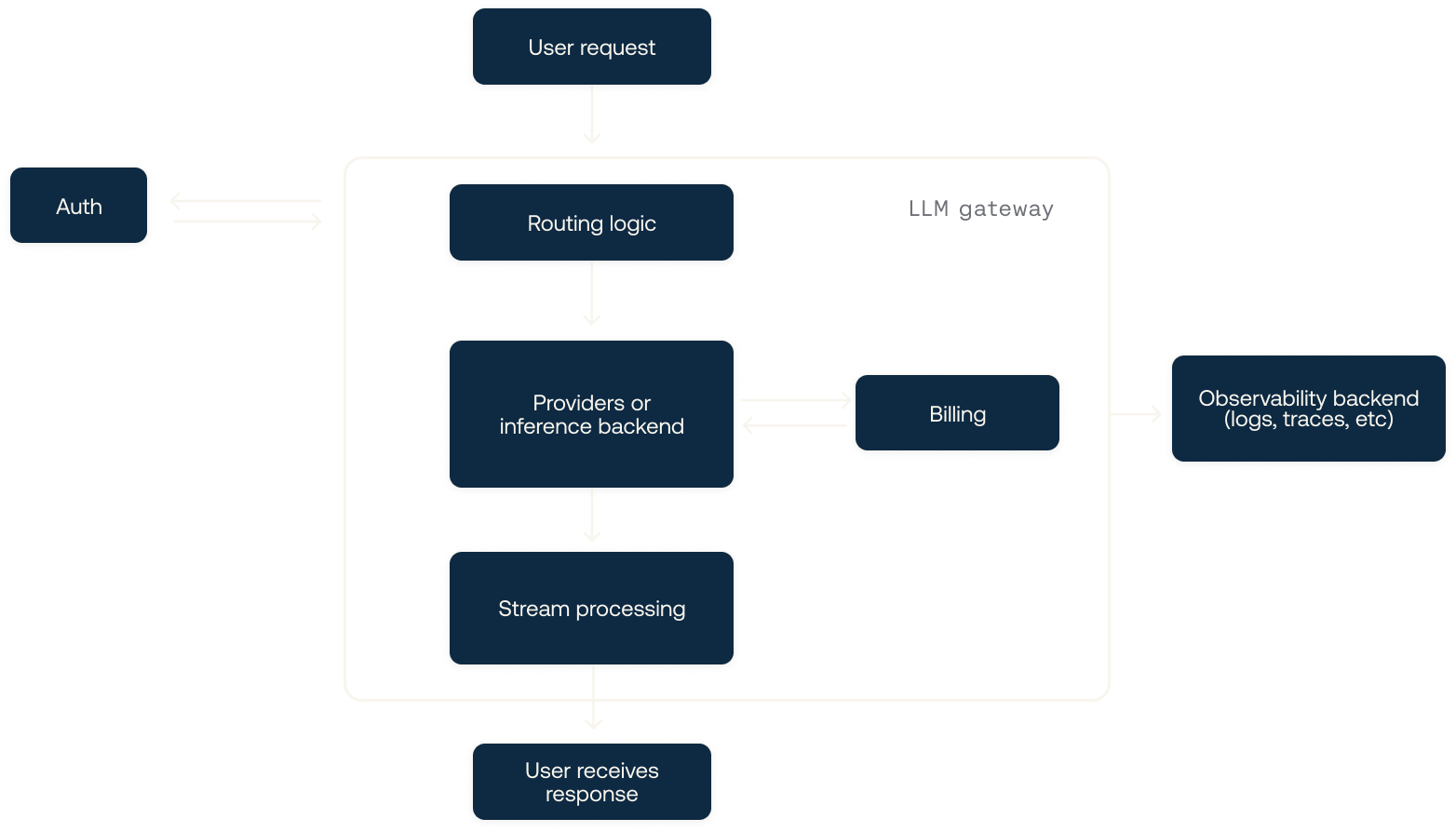
Creating the Rust service
Start with a new Rust binary project:Cargo.toml - explanations added in the code snippet:
Loading configuration
The gateway reads everything from environment variables. For infrastructure code like this, environment variables are a good default because the same binary can run locally, in Docker Compose, or in a hosted environment without a separate config file format. Additionally, many providers will allow you to store your own environment variables as secrets in their own container runtime. This is often much safer than trying to use something likedotenv (or dotenvy in Rust, as the original dotenv crate is mostly deprecated).
Create src/config.rs:
- The database URL
- Your Venice API key
VENICE_BASE_URL points at https://api.venice.ai/api/v1, and CAPTURE_GENAI_CONTENT defaults to false so prompt content is not logged unless you intentionally enable it.
That second default is the more important one. A gateway can see every prompt and response flowing through it, but observability should not automatically become content capture. In most production systems, token counts, latency, model names, status codes, and billing metadata are enough for operations. Generally speaking, logging prompts and conversations in production may not only be a privacy liability - it can also be a storage liability. Adding them means creating spans and traces with an extremely high level of cardinality (i.e., the uniqueness of data within a dataset). This can make searching through your observability data very expensive, in addition to potentially hampering performance when searching through the data.
Creating the database schema
Next, createmigrations/0001_api_keys.sql.
We will store only the first 12 characters of each gateway API key as a lookup prefix, plus the SHA-256 hash of the full key. That lets the gateway find a candidate row quickly without storing raw credentials.
The prefix is not secret. It exists for indexing. The hash is what proves that the caller presented the full key. This is the same basic shape used by many API-key systems: show the raw key once, store a non-reversible representation, and keep a short prefix around for lookup and support workflows.
- API keys are never stored in plaintext.
- Rate limit settings must be positive.
- Revoked keys cannot remain active.
- A rate limit window is uniquely identified by key, start time, and window length.
Building the Venice client
Next, we will createsrc/venice.rs. The client only needs to know the upstream chat completions URL, the Venice API key, and how many times to retry transient failures.
Keeping this wrapper small is intentional - the gateway should not reimplement Venice’s entire API. At a basic level, the gateway’s job is to attach the server-side credential, apply a timeout, retry requests that are safe to retry, and return the upstream response in a form the router can forward.
EventSource from the same request:
serde_json::Value. That is a deliberate compatibility choice. If we model every possible chat-completion field in Rust, we have to keep the gateway updated every time the upstream API adds a useful option. By parsing only what we need elsewhere, we let newer Venice parameters pass through without a gateway release.
Sharing application state
Createsrc/state.rs:
PgPool is already a shared pool handle, and Arc<Config> keeps configuration cheap as well.
This gives every handler access to the same three things: immutable configuration, pooled database connections, and the Venice client. Keeping them in one AppState also makes testing simpler later because handlers receive their dependencies through Axum state instead of reading globals.
Authenticating gateway API keys
The client sends its gateway key like this:src/auth.rs and implement an Axum extractor. The extractor lets protected handlers declare that they require an authenticated key:
- Parse the bearer token.
- Take the first 12 bytes as the key prefix.
- Hash the full candidate token with SHA-256.
- Load the active key row by prefix.
- Compare the stored hash and candidate hash in constant time.
AuthenticatedApiKey cannot accidentally skip auth inside the function body; Axum has to construct that value before the handler runs. That keeps the protected path easy to audit.
Adding fixed-window rate limits
Createsrc/rate_limit.rs. The rate limiter uses one SQL statement to insert a new window or increment the existing one:
WHERE api_key_rate_limit_windows.request_count < $3 clause is the important bit. When the window is already full, Postgres does not update the row and RETURNING produces no row. The handler can turn that into a 429 Too Many Requests response with a Retry-After header.
A fixed window is not the most sophisticated rate limiter, but it is easy to explain, easy to inspect, and good enough for a gateway tutorial. The tradeoff is that traffic can bunch up around window boundaries. If you need smoother behaviour at scale, a token bucket or sliding-window limiter backed by Redis is a natural next step.
Returning OpenAI-style errors
Createsrc/error.rs and make application errors implement IntoResponse:
Building the router
Now we can wire the HTTP routes insrc/router.rs:
AuthenticatedApiKey. If authentication fails, Axum never enters the handler body:
model, messages, and stream. Everything else in the JSON body passes through to Venice. That keeps the gateway compatible with provider features you may want to use later.
The handler also makes the two response modes explicit. Non-streaming requests wait for Venice to return a full JSON response, then record response metadata before sending the bytes downstream. Streaming requests return immediately with a text/event-stream body backed by an async stream. That split keeps the non-streaming path simple while giving the streaming path enough control to observe chunks as they pass through.
Supporting streaming responses
Streaming chat completions use server-sent events. Venice sends SSE data, and the gateway relays that data back to the client. The gateway should avoid buffering the whole stream because that would defeat the purpose of streaming. Users care about the time to first token, not only the time to final token. By forwarding each upstream event as it arrives, clients can render partial output while the model is still generating. Createsrc/sse.rs:
data: ... events, and the stream ends with data: [DONE].
The stream observer is also where we can collect metadata without changing what the client sees. Each chunk is forwarded in SSE format, but the gateway can still watch for response IDs, finish reasons, token usage, cost fields, and timing information as those chunks pass through.
Recording GenAI telemetry
Gateways are useful because every request passes through one place. That makes them a great spot to record model, latency, token usage, finish reasons, billing cost, and streaming timings. Createsrc/telemetry.rs and start by parsing the request:
id:
Starting the server
Now wire everything together insrc/main.rs:
- Reads configuration.
- Initializes telemetry.
- Connects to Postgres.
- Runs SQLx migrations.
- Builds shared app state.
- Starts the Axum server.
docker compose up can bring the whole stack to a working state. In a larger production deployment, you may prefer to run migrations as a separate release step so schema changes are reviewed and applied before new gateway instances start.
Seeding a local gateway key
For local development, createscripts/seed_api_key.sh. The script inserts a gateway API key into Postgres by storing its prefix and SHA-256 hash:
Running locally
To run locally, we’ll use Docker Compose to start both the gateway and Postgres. This keeps the tutorial reproducible: readers do not need a manually configured database, and the gateway can use the sameDATABASE_URL shape it would use in a containerized deployment.
-d flag if you want to use your terminal for other things after (and then use docker compose down to remove it).
In another terminal, seed the development gateway key:
5432, remove the host port mapping for the Compose Postgres service. The gateway only needs to reach Postgres on Docker’s internal network.
The important thing to keep in mind is that the Venice API key belongs only in the gateway environment. Client requests should use the seeded gateway key. That separation is the whole point of putting a gateway in front of the model provider.
Testing the gateway
First, check health:Extending this gateway
This gateway is intentionally small, but it gives you a solid foundation. Good next steps include:- Add per-subject budgets and monthly spend limits.
- Support multiple upstream providers behind the same OpenAI-compatible API.
- Store request metadata for audit logs while keeping prompt logging disabled by default.
- Add an admin API for creating, revoking, and rotating gateway keys.
- Add model allowlists per API key.
- Add Redis or another shared store if you need lower-latency rate limiting across many gateway instances.