

brave, google, or exa. They all cost the same $0.01 per search, so the obvious question is which one you should actually use.
In this article, we’re gonna find out. We built a benchmark that sends the same 162 questions to each provider, has the same model answer from each provider’s results, and grades both the results and the answers. We’ll go through how we picked the questions, what we found, and how you can run it on your own.
Interested in the full code? Check out the GitHub repo. It also has every answer and every provider’s result list from this run, so you can check our working without paying for a run.
What We Measured
There’s two different things a search provider can be good at, and they don’t always line up:- Retrieval: are the results relevant, and do they actually contain the answer?
- Answers: when you hand those results to a model, does it answer correctly?
POST /augment/search once per provider, with limit set to 10. Then zai-org-glm-5-2 answers from each provider’s results, and grok-4-7 grades everything at temperature 0. The model also answers with no search at all, as a baseline.
Note that the providers don’t return the same amount of text, or even the same kind. In our run, Exa returned 10 results per search and Brave between 7 and 10, made of passages matched to the question, at about 1,500 to 1,700 characters each. Google returned 5 results, which is what Venice’s API returns for google whatever you set limit to. Most of them were the full text of the page, starting at the top: navigation, cookie banners, and all. Not all of them, though: when a site blocks scraping, like Reddit, Facebook, Stack Overflow, or YouTube, the result is only the search snippet. In a rerun on 11 November, a quarter of Google’s top 5 results had under 300 characters of text. That came to about 9,700 characters per result, or 48,000 per search, against about 14,000 for Brave and Exa. More text can mean better answers, but it also means more input tokens on every request. To see how much the volume matters, the model answers from each provider’s results three ways:
In the two budgeted conditions, every provider gets the same number of results and the same amount of room. Since the harness keeps the start of each result, they also test how well each provider’s results hold up when you trim them, which is what plenty of real pipelines do.
The questions
The first version of this benchmark had a problem: without search, the model already answered 72% of the questions we could grade, so all three providers looked about the same. If the model already knows the answer, search can’t make much of a difference, and it can’t tell you which provider is better either. So for this run, we put together 156 questions with gold answers, where the answer has to come from a search:
The coding questions come in a few styles, from pasted error messages to version-pinned questions like “Which ripgrep version started respecting the GIT_CONFIG_GLOBAL environment variable?”. That’s on purpose: a search engine that’s great with natural language can still fall over on an error string. There’s also 6 general questions without a gold answer, like long conversational questions, which we’ll come back to.
Every question with a gold answer went through the same checks before it made the cut. We drafted each one with AI agents from a primary source, like a release note or an official press release, and a script fetched every source to confirm that the quote behind the gold answer was actually on the page. Then the model answered every question twice without search, and we dropped any question it got right either time.
For the news and sensitive questions, we also gave the model the source quotes as its search results, and only kept a question if it answered correctly both times. This catches ambiguous questions, and checks that the model will answer a sensitive question when it has the source. Finally, another agent double-checked every question and gold answer against the sources, which led to 47 edits and 3 more drops, and every edited question went back through the no-search screen.
Note that this makes the no-search baseline close to zero by design, so it doesn’t tell you how often search helps in general. What it does tell you is that every question in the set needs a search, which is exactly what we want when we’re comparing search providers.
The metrics
Accuracy comes with a 95% confidence interval, and differences between providers come from paired comparisons on the same questions: a bootstrap interval and an exact McNemar test. With 156 gold answers, each question is worth about 0.6 percentage points, and the intervals on accuracy are up to about ±7 points, so it’s worth checking the paired comparisons before reading much into a small gap.
Results
Exa answered the most questions correctly
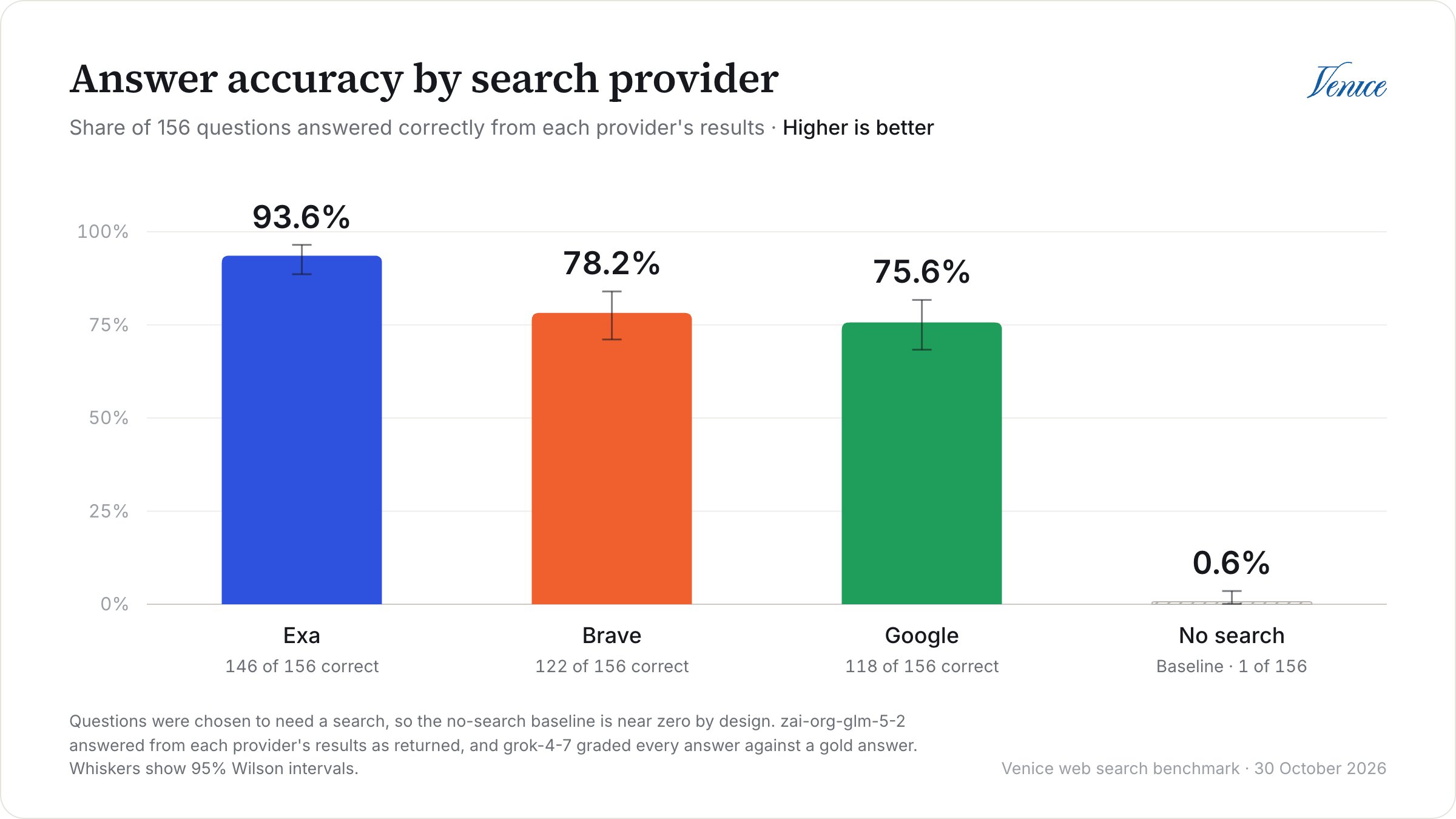
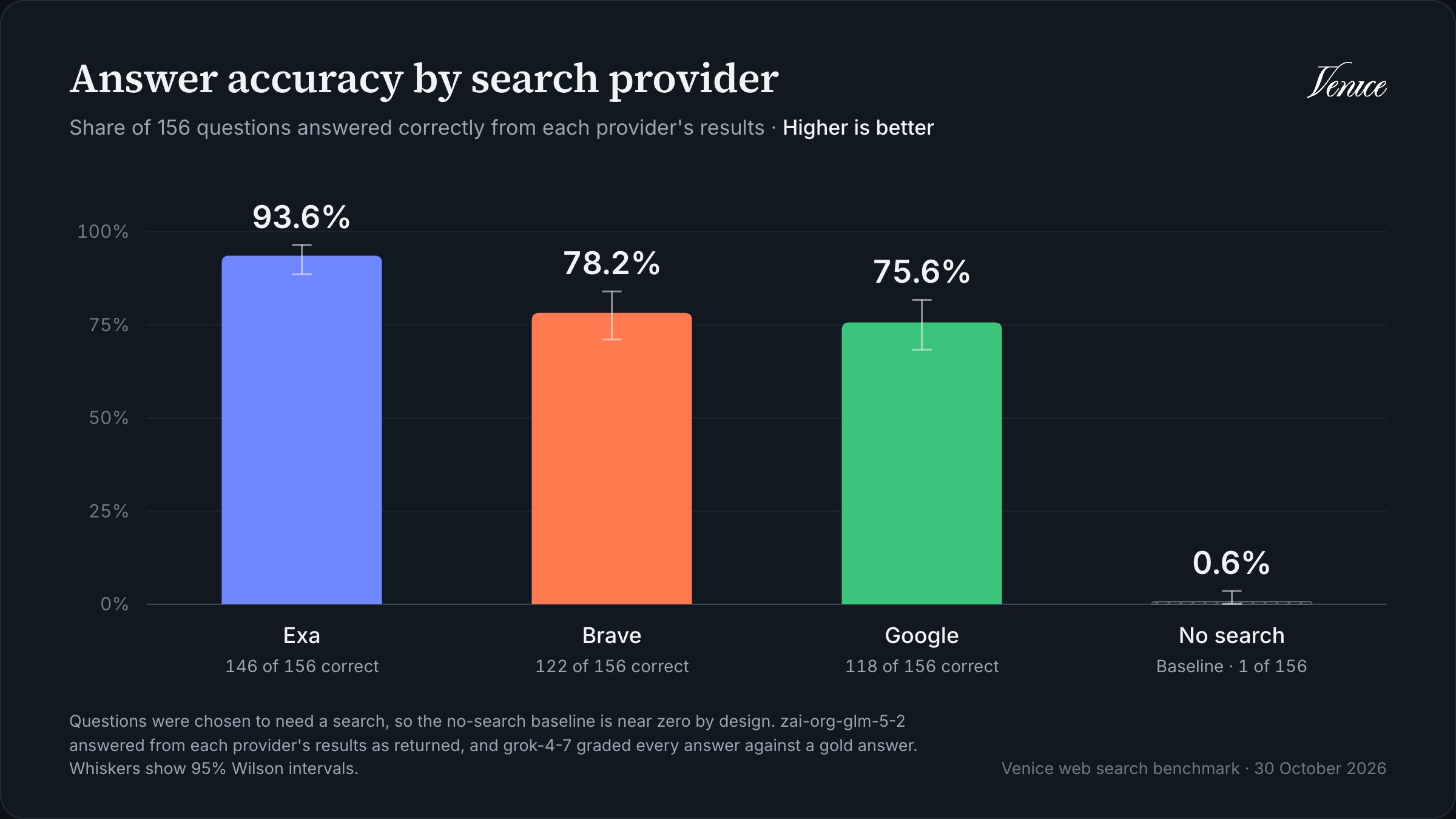
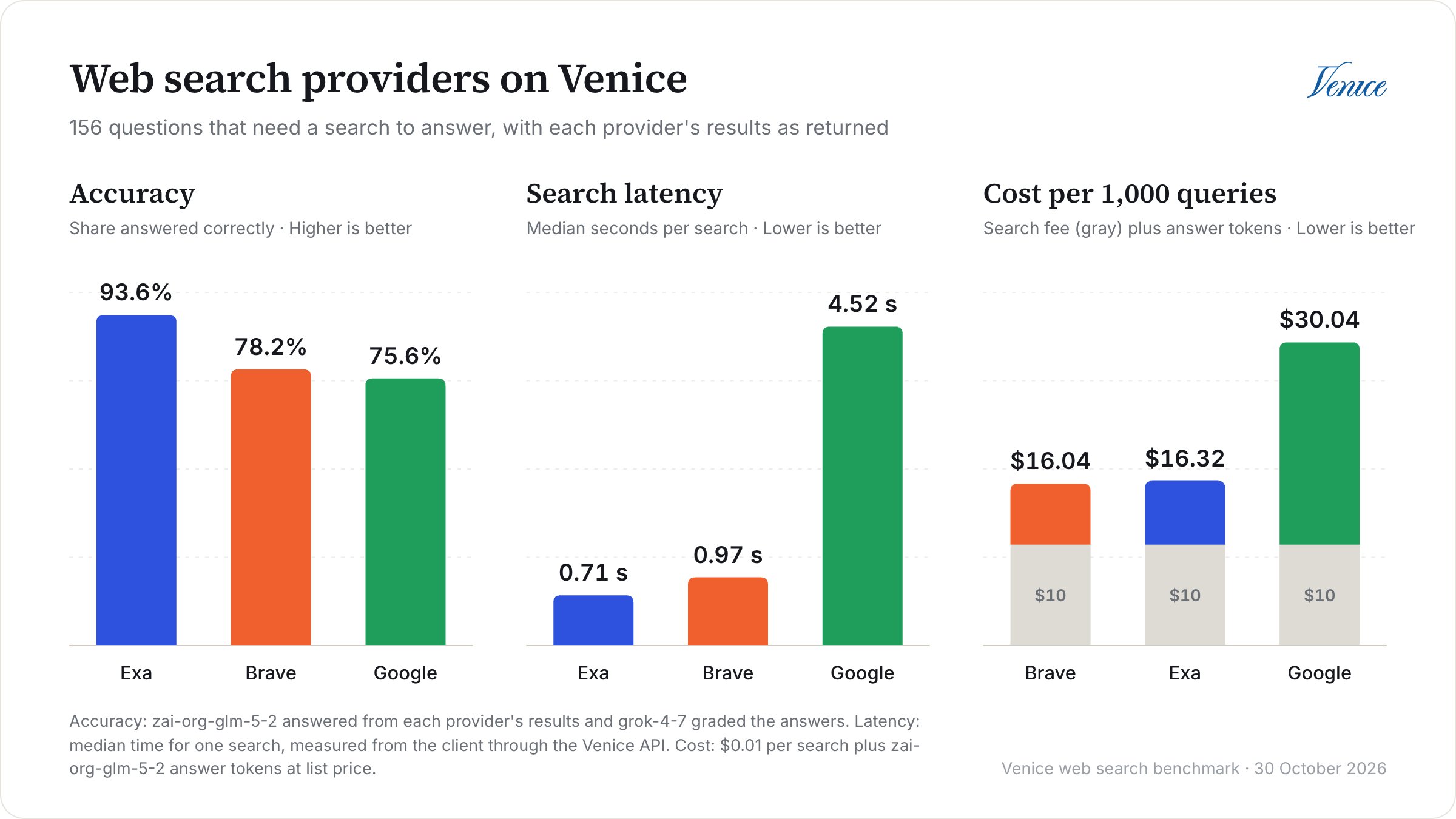
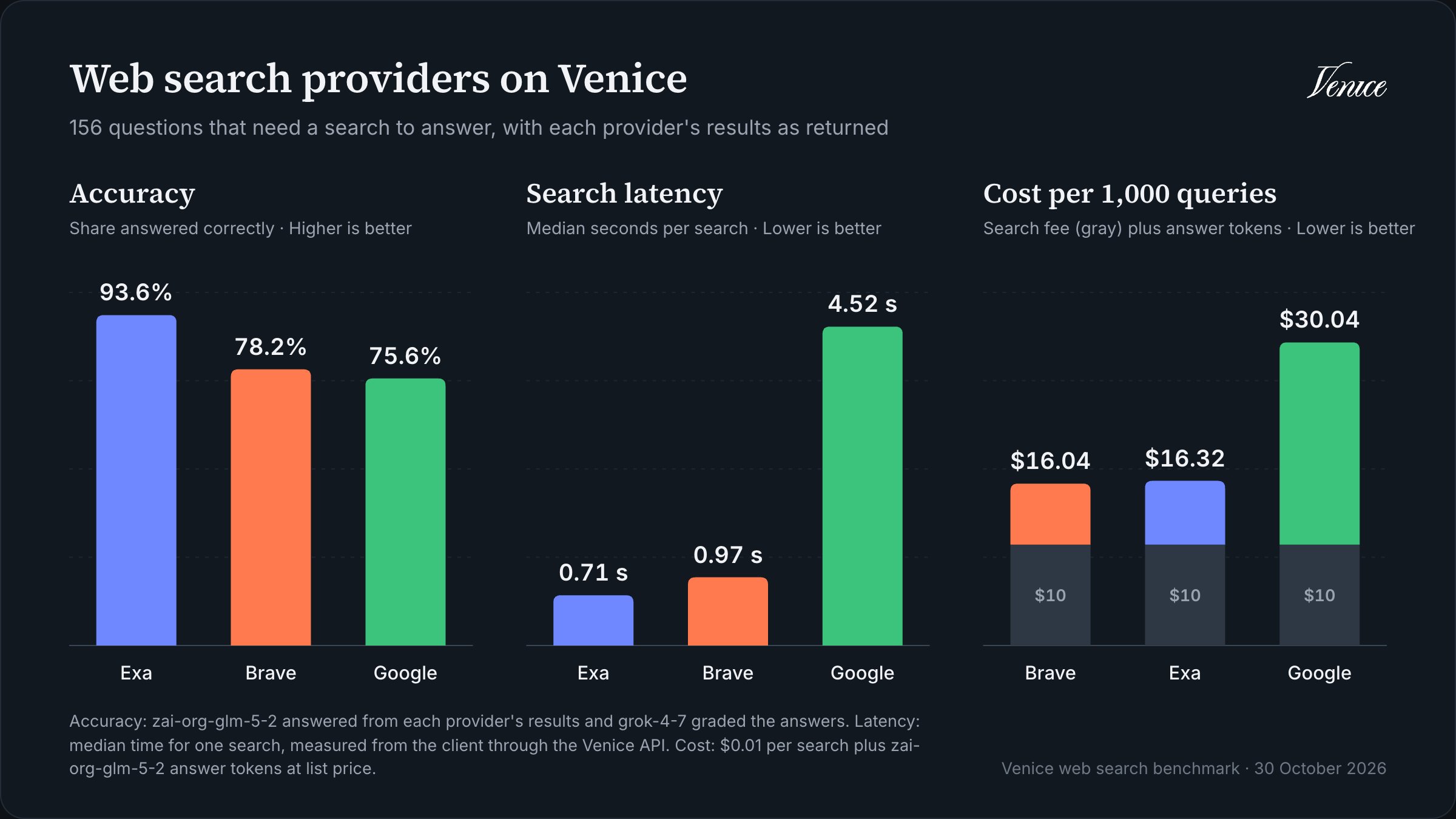
With every result as returned, Exa answered 93.6% of the questions correctly, about 15 points ahead of Brave and 18 ahead of Google. This time, the gap is clear: Exa got 28 questions right that Brave missed, with only 4 going the other way, and 33 that Google missed, against 5 (McNemar p < 0.001 for both).
To check that this wasn’t a one-off, we reran the full benchmark on 11 November with the same settings, and its results are in the repo too. Exa came out on top again, at 93.6% against 81.4% for Brave and 72.4% for Google, and led Brave by 12.2 points (24 questions to 5, p = 0.001).
Brave against Google is less settled. In this run, they were level, at 22 questions to 18, which is well within the noise. In the rerun, Brave pulled ahead, at 29 questions to 15 (9.0 points, p = 0.049). So Brave was level with or ahead of Google, depending on the run.
We also wanted to know whether Exa’s lead came from how the questions were phrased, since we searched them exactly as written, and real applications usually rewrite them into search queries first. So in another rerun, on 10 November, we had the model rewrite each question once into a search-engine query, sent that same query to all three providers, and graded the answers to the original question. Exa still led Brave by 13.5 points (24 questions to 3), and no provider’s score changed significantly, so phrasing doesn’t explain Exa’s lead.
The no-search answers are worth a look, too. Without search, the model told us to read a
Retry-After header after a 429 instead of Venice’s x-ratelimit-reset-requests, invented a -web-search suffix for turning on web search through the model name, and listed a venice search provider that doesn’t exist. If your users ask about new or niche APIs, the model’s own knowledge isn’t going to cut it.
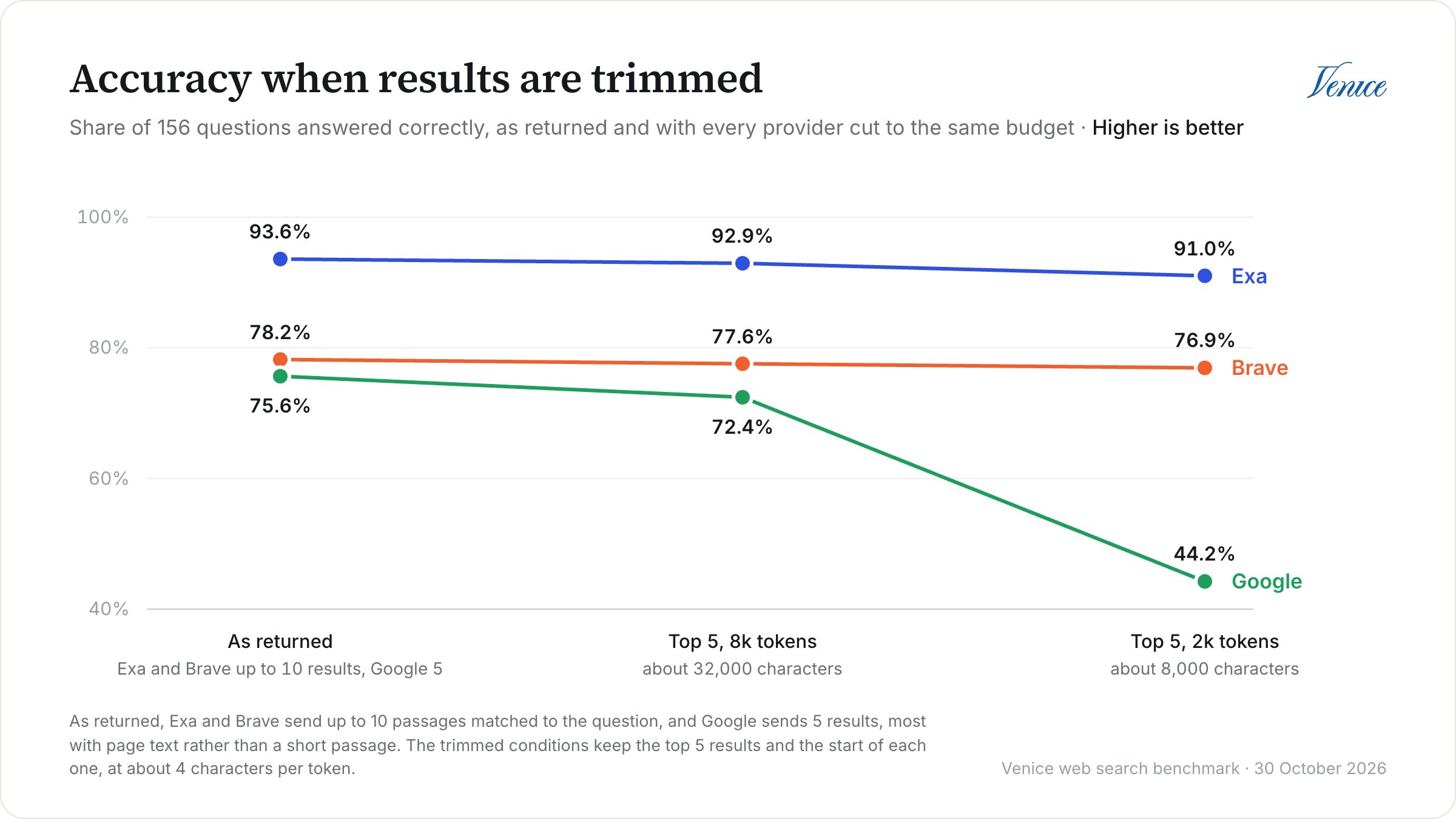
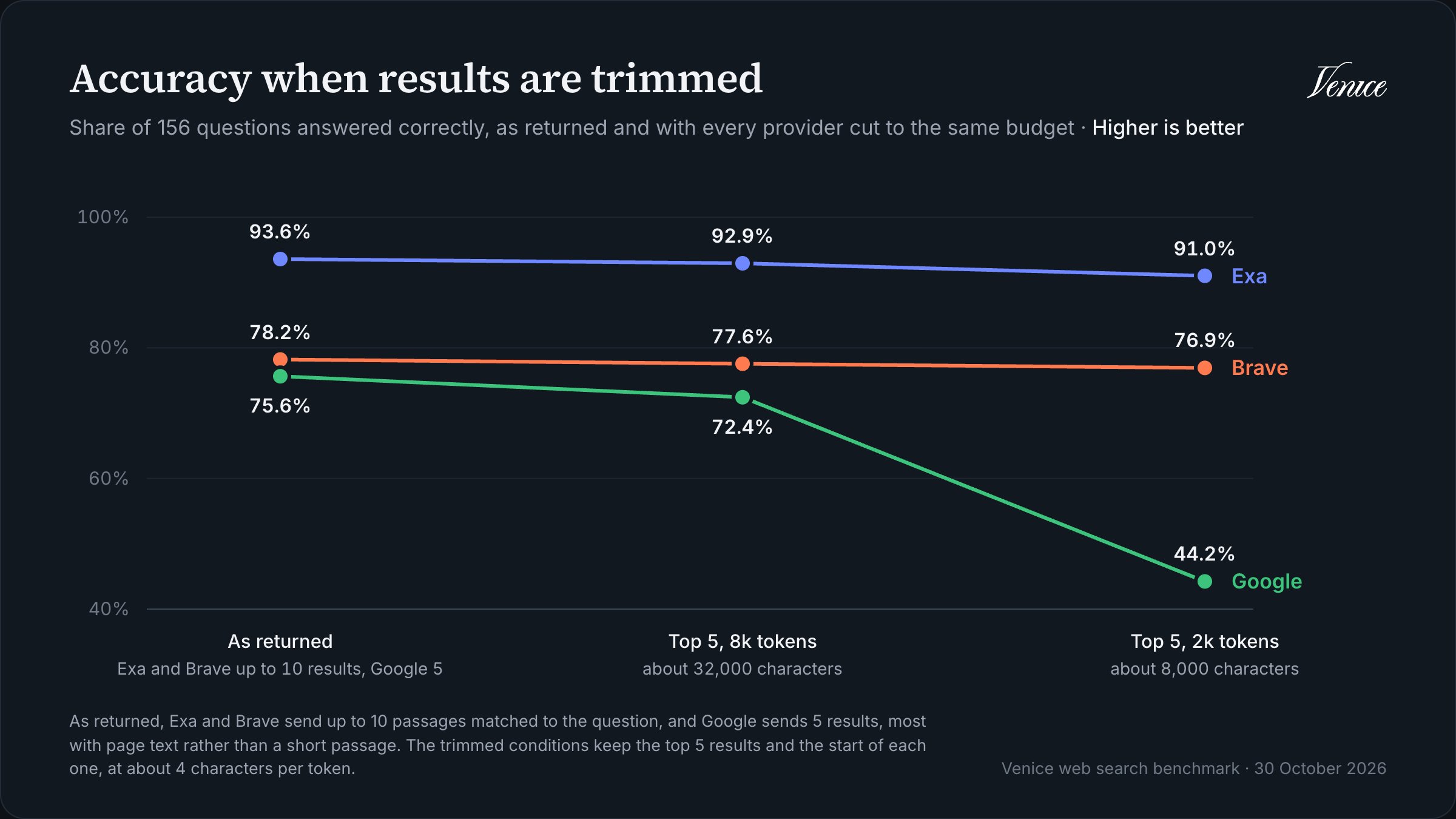
The budgeted conditions are where Google falls over. At 2,000 tokens, its accuracy dropped to 44.2%, and the model couldn’t find an answer for 30% of the questions, compared with 10% when it had Google’s full results. Since Google’s results start at the top of the page, trimming them to fit kept the navigation and banners and cut the part that answered the question. Brave’s and Exa’s results are already passages matched to the question, so trimming them barely made a difference. At 8,000 tokens, Google got most of the way back, to 72.4%.
Where Exa’s lead comes from
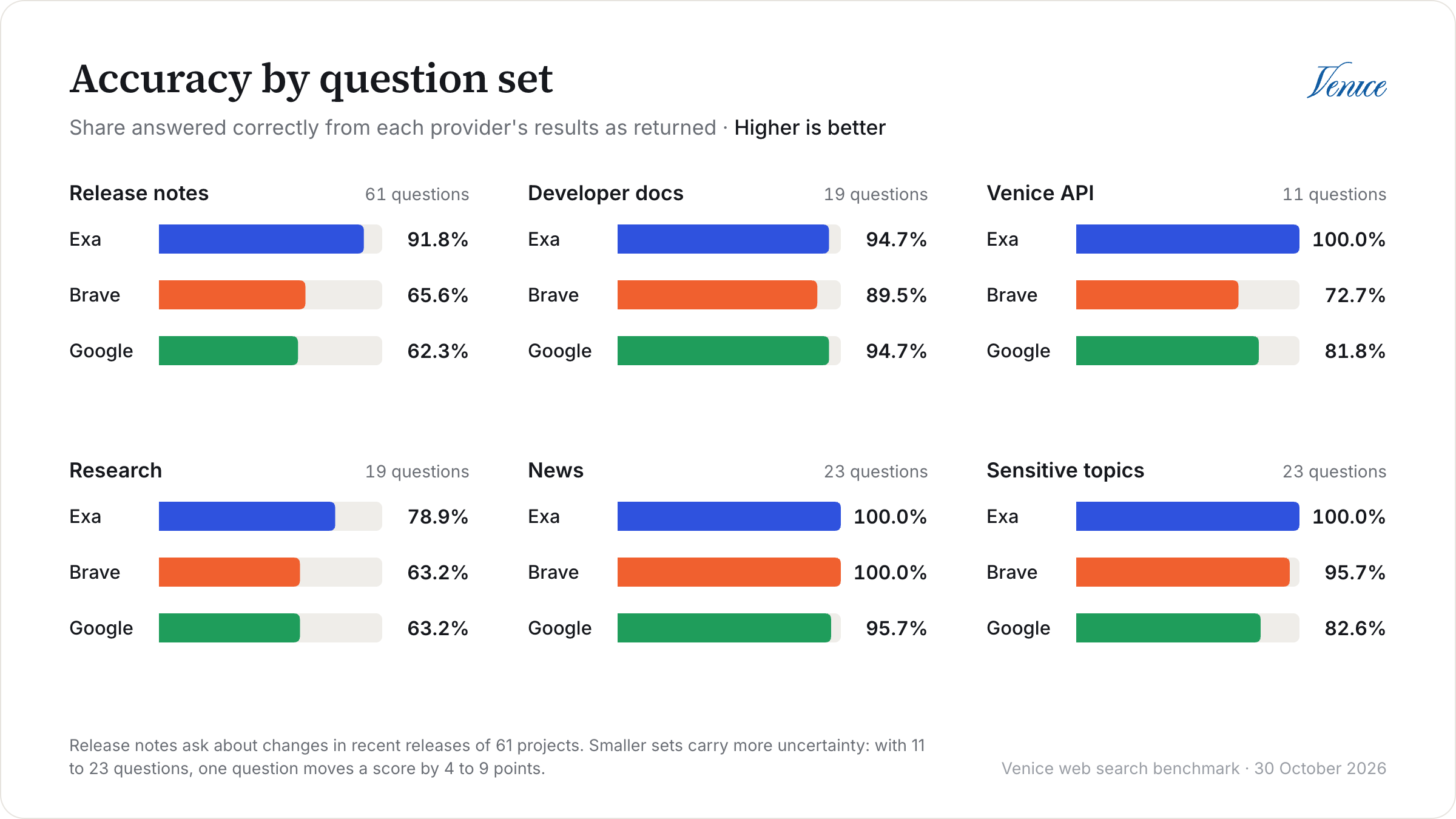
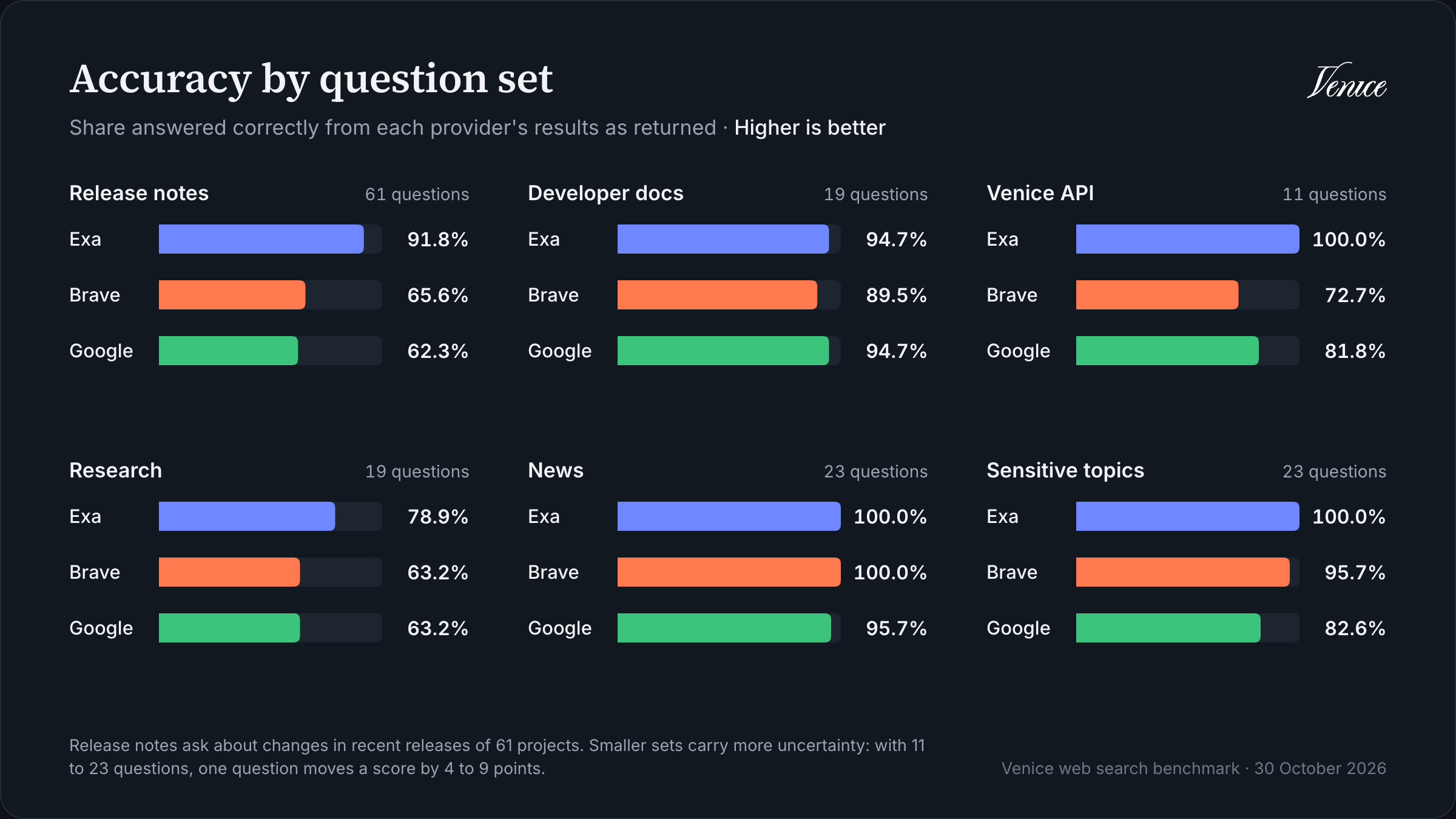
Most of the gap comes from one place: release notes. Exa answered 56 of the 61 release questions correctly, compared with 40 for Brave and 38 for Google. The answer to these usually sits in a single line of a changelog, and Exa’s results were much more likely to include it. On the release questions with a known identifier, like a flag or an environment variable, Exa’s results contained 97% of them word for word, against 76% for Brave and 68% for Google. On version-pinned questions across all the coding sets, Exa got 95% right and the other two got 55%.
The research questions were the hardest for everyone, since they need two facts from two different pages, and even Exa only got 15 of the 19. On news and developer docs, though, all three providers answered nearly everything. If those look like your users’ questions, the provider you pick matters a lot less.
What about sensitive topics?
Some search services filter or bury results on sensitive topics, so we added 23 questions to check whether any of the three providers did. They cover things like drug law, abortion, sex work, firearms, surveillance, and internet shutdowns, and each one has a factual answer from an official source, like a court ruling or a government notice. No provider came back empty or with an error on any of them, and the model never refused to answer one because of its topic. Exa answered all 23 correctly, Brave 22, and Google 19. The misses were ordinary search misses, where the results didn’t have the fact or had a different date, apart from one Google answer that hedged but gave the right date, which the judge was too strict on. Note that 23 questions can only show that we didn’t see any filtering, not that there’s none anywhere.Exa returned the most useful text
Exa’s results were also the most relevant. Its nDCG@5 was 0.15 higher than Brave’s (95% CI 0.11 to 0.19) and 0.32 higher than Google’s (95% CI 0.28 to 0.36), and Brave was 0.17 ahead of Google.
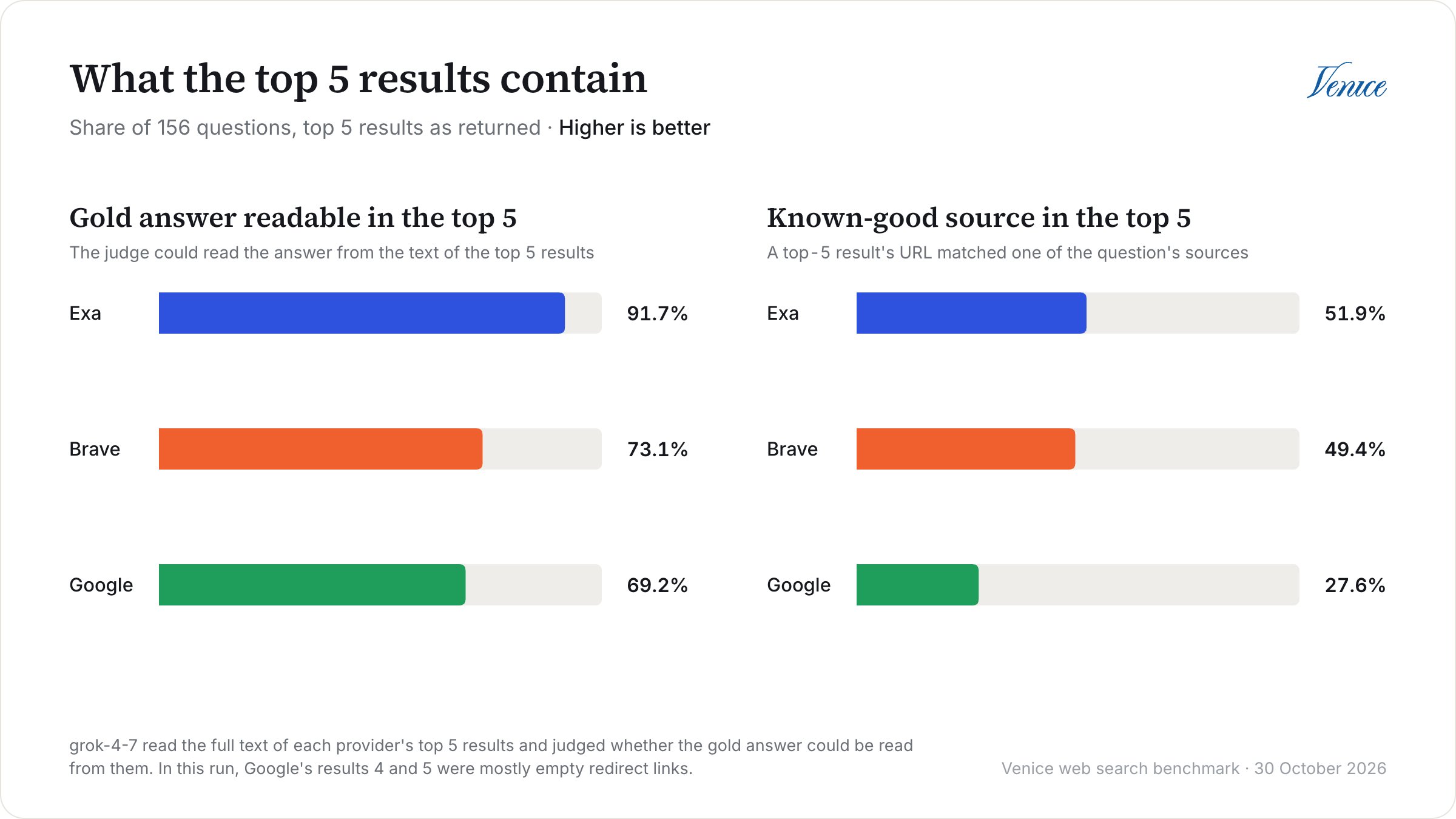
Google’s numbers here include a problem that has since been fixed, though. In this run, results 4 and 5 from Google were
google.com/goto?url=… redirect links in 144 of the 162 searches, and most of them had almost no text, so about a third of Google’s top 5 results were close to empty. They were gone by the 11 November rerun, where Google’s nDCG@5 went up from 0.43 to 0.47 and its gold URL hit@5 from 27.6% to 31.4%. Exa and Brave still ranked ahead.
That score covers the text each provider sent back, though, not just the pages it picked. When two providers returned the same page, the judge gave both copies the same score 71% of the time, and where the scores differed, the shorter copy scored lower in 69% of cases. To separate the two, the harness also scores each page by the best grade any provider’s copy of it got. On that per-page measure, Exa’s lead over Brave shrinks to 0.09 (95% CI 0.05 to 0.13), but it doesn’t go away, and both picked better pages than Google. Note that this only evens things out for pages that more than one provider returned. Everything else is still scored on the provider’s own text.
Brave and Exa cost about the same, and Google costs the most
The search itself costs the same $10 per 1,000 queries on every provider, so the cost difference comes from the tokens you send to the model afterwards. Brave and Exa came out about the same, while Google’s page text made answer prompts about 3.6 times the size of Brave’s, which nearly doubled the cost per query. These costs use
zai-org-glm-5-2 list prices with no cache discount, so the exact figures depend on your model, but the ratios between providers hold up.
Exa was the quickest at the median this time, at 0.71 seconds against 0.97 for Brave, but we wouldn’t rank those two: Brave was quicker in our first run, the day before, when Exa’s median was 1.73 seconds, and again in the 11 November rerun, at 0.99 seconds against 1.54. Latency is measured from the client through the Venice API, so it includes network time and Venice’s own overhead, and it moves around between runs. What did hold up across all three runs is that Brave and Exa both stayed under 2 seconds at the median, and Google was the slowest every time, at 4.52 seconds here and 5.36 in the rerun.
The general questions
The 6 general questions don’t have a gold answer, so instead the judge compared each pair of providers’ answers head to head, twice with the order swapped. Exa’s answers beat Google’s on 4 of them, but with only 6 questions, that’s not something we’d lean on. The full breakdown is in the report.So Which One Should You Use?
Based on this run, here’s how we’d choose:- Exa, for most workloads that pass results straight to a model, and especially coding assistants and research agents. It had the best or joint-best accuracy on every question set and the most relevant results, for about the same cost per query as Brave.
- Brave, if your questions look more like our news and docs questions, where it was level with Exa, or if you mostly need to find the official page for something, which it did about as often as Exa. It’s the default, and it’s quick and cheap.
- Google, if you want page text straight from the search response, without a separate scrape. Most results are the full page, but about a quarter are only the snippet, when the site blocks scraping. You’ll need to budget for the extra tokens and latency, and if you trim the results, keep the passages that match the question rather than the start of each page.
Caveats
There’s a few things to keep in mind before reading too much into these numbers:- The questions were picked to need search. We dropped every question the model could answer on its own, so the set is harder than everyday traffic.
- AI agents wrote the questions. Every one was checked against its sources and reviewed, but a gold answer can still be wrong. If you spot one, open an issue on the repo.
- Release notes are a big chunk of the set. They’re 61 of the 156 gold answers, and they’re where most of Exa’s lead comes from, so compare the table by question set with your own workload.
- The grades come from a model. We went through every answer the judge didn’t mark correct with results as returned, 82 in all, plus 30 that it did. We’d change 6 of them, all from wrong to right: 3 for Brave, 2 for Google, and 1 for Exa. That would put Brave at 80.1%, Google at 76.9%, and Exa at 94.2%, so the ranking doesn’t change, but the judge leans a little strict.
- Search results change. These numbers are a snapshot from October 2026, and time-sensitive gold answers, especially the news ones, go stale. Our 11 November rerun kept the same ranking for Exa, but moved Brave against Google and Google’s relevance scores.
- Our main run searched each question exactly as written. Rewriting the questions into search queries didn’t change the ranking in our 10 November rerun, but your application’s own rewriting could.
- We tested the providers through Venice’s API. Each one comes back in its own format, so these numbers describe the three options as the API returns them, not the search engines in general.
- Relevance scores depend on how much text comes back. A short extract can score lower than a longer copy of the same page. The per-page score corrects for that on pages more than one provider returned, but not on the rest.
- The budgeted conditions trim from the end. A pipeline that picks passages by relevance instead would treat Google’s results better than ours did.
- One model wrote every answer, and the same model screened the questions. A different model could make better (or worse) use of long results, and might already know some of the answers.
Running It Yourself
The harness is a small Bun and TypeScript project with no runtime dependencies. Once you’ve cloned the repo, install the dev dependencies and run the tests:.env file in the repo:
--budget, which defaults to $5. Our full run cost $36.10: $4.86 for 486 searches, plus answer and judge tokens. The estimate leaves out cache discounts, so it comes in higher, at about $50. Each run writes a report.md with the full tables behind this article, a results.csv with one row per question, provider, and condition, a summary.json, and two files with every answer and every provider’s result list.
If you just want to dig through our numbers, you don’t need to run anything at all, since the repo’s results folder has all of these from this run.
The real value, though, is running it on your own questions. Write them as JSON Lines, with one object per question:
goldAnswer still get retrieval scores, so you can start with a list of real queries from your logs and add gold answers later. Before you trust the accuracy numbers, though, check how many of your questions the model gets right with --arms none, since questions it already knows the answer to won’t tell your providers apart.