

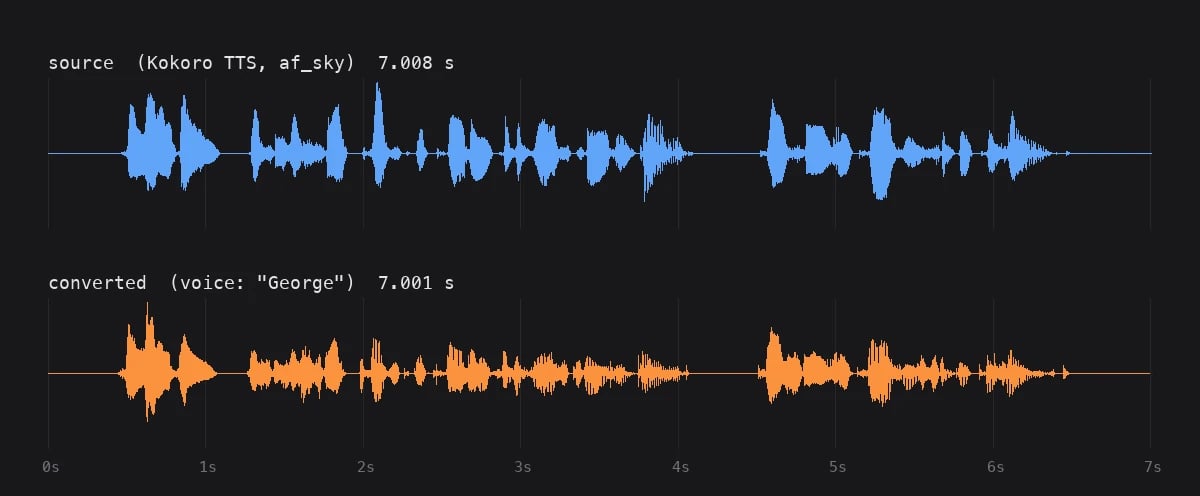
/audio/speech and the result of converting it to the George voice. The waveforms sit on one time axis, and the gaps between phrases land in the same places.
/audio/voice-changer/: quote prices a length, queue submits the recording and charges you, retrieve polls until the MP3 is ready, and complete deletes the stored media once you have it. The shape is the same as the music endpoints, but the path is different and the two do not accept each other’s models.
The examples assume VENICE_API_KEY is set:
Choose a model
Voice-changer models live underGET /models?type=music with model_spec.voice_changer set to true; there is no dedicated type filter. Right now there is one, elevenlabs-voice-changer: it takes mp3, wav, ogg, mp4, or aac sources up to 300 seconds, offers 20 named voices with Aria as the default, accepts a raw ElevenLabs Voice ID in place of a name, and supports remove_background_noise and seed. Those details can change, so read them from the API. This query returns everything the rest of the guide depends on:
400. A recording longer than max_source_audio_duration_seconds returns 422 before any charge, with the limit in the message.
One thing the API does not check at queue time is the voice name. Queue a voice the model does not have and you still get 200 and a queue_id; the rejection arrives on the first retrieve, with the charge refunded. You get the money back but lose the round trip, so check voices before you queue.
1. Get a price quote
Billing is by the length of the source recording, rounded up to the next whole minute. Forelevenlabs-voice-changer that is $0.35 for anything up to 60 seconds, $0.69 up to 120, $1.04 up to 180, $1.38 up to 240, and $1.73 up to 300. A 7-second clip costs the same as a 60-second one, and 60.5 seconds is billed as two minutes. If you have many short segments, join them into one file that stays under a minute boundary instead of queueing each separately. The tiers come from pricing.durations in /models.
Quote takes a whole number of seconds and needs no API key:
2. Queue the conversion
Send the recording either as a multipartfile upload or as an audio_url in a JSON body, but not both. A URL has to be publicly reachable without headers or cookies; Venice fetches the bytes itself and never passes the URL to the provider. Venice checks the bytes, not the extension, so a file has to actually be one of the accepted containers, and files with a video track are rejected.
With curl -F, leave Content-Type alone so curl can set the multipart boundary, and send remove_background_noise as true/false and seed as digits.
voice to get default_voice. When supports_custom_voice_id is true, voice can also be a provider Voice ID; for elevenlabs-voice-changer that means any ElevenLabs voice you have access to, including library voices that are not in Venice’s voices list. remove_background_noise and seed are only accepted when the model reports support for them.
The response gives you the handle for everything that follows:
duration_seconds is the length Venice measured, and the tier you were billed on. If you quoted 60 and this says 61.2, you paid for two minutes. Keep model and queue_id; retrieve and complete both need them, and the id is good for 24 hours.
You have been charged at this point, not when the audio comes back, so do not retry a queue request. If you have a queue_id, poll with it. If the response never arrived, sending the recording again can charge you twice. Queue is limited to 40 requests per minute and retrieve to 120; both report x-ratelimit-remaining-requests.
3. Poll and download
Call retrieve with the values from the queue response:audio/mpeg and the body is the MP3. Branch on Content-Type.
The two numbers are milliseconds: how long jobs on this model usually take, and how long yours has been running. The gap is a reasonable first sleep, but the average is only a hint. A 148-second source took 24 seconds against an average of 7, so on longer inputs execution_duration will overtake average_execution_time. When it does, fall back to a fixed interval of a few seconds and keep going. Short clips go the other way: the 7-second example came back on the very first poll.
The finished response carries x-venice-audio-duration (seconds), x-venice-inference-time, x-venice-audio-format, x-venice-model-id, and x-venice-model-name. Output is always 128 kbps mono MP3 at 44.1 kHz, whatever you sent in. The audio duration should match your source to within a few milliseconds; if it is off by more than that, listen before you ship it.
If it fails
A job the provider accepted and then failed comes back as an error status witherror and credits_refunded in the body. true means the charge was reversed. false with a message ending in “please contact support” means the refund itself failed and the next poll will try again. The verdict is stored, so polling again replays it.
A job that never reached the provider looks different. Retrieve keeps saying PROCESSING for up to 10 minutes, then returns 504 and refunds you, so give a PROCESSING job at least that long before you treat it as stuck. The full set of terminal outcomes is on the retrieve reference.
Clean up
Passdelete_media_on_completion: true on retrieve and the stored media is deleted in the same call that hands you the audio. Any later retrieve for that id returns 404. If you want to download more than once, leave it off and call complete when you are finished. Complete returns {"success": true} and is safe to call repeatedly.
Complete example
Everything above, end to end: check the voice exists, quote, upload, poll until the audio arrives, save it. The deadline is 12 minutes so that a dispatch failure shows up as a refund rather than a timeout.delete_media_on_completion and call complete yourself if you need the file more than once.